
Skip to content
Learn MikuMikuDance – MMD Tutorials – Free 3D Animation Software

Learn MikuMikuDance – MMD Tutorials – Free 3D Animation Software

Download Free Animation Software – Let's Learn How to Do Everything!

  • Step-by-Step MMD instructions
  • DOWNLOADS
  • Troubleshoot, Fix MMD
  • Site Contents
  • Reggie Replies Q&A
  • Homework!
  • What IS MMD?
    • Download MikuMikuDance Newest Latest Version of MMD
  • “HOW TO”
    • Raycast RAY-MMD Effect Tutorials
  • BONUS PAGES
    • Why convert PMD models to PMX?
  • HALL of CHAMPIONS
  • Tutorial Categories
  • About
    • Privacy Policy
  • Toggle search form
  • Add Shadows to MMD .X Accessories Tutorial MMD Basics
  • THIS IS TARGET Meme by Zazi on LearnMMD.com MMD Memes
  • The Making of “Viva La Vida MMD” by Zazi The Angel "the making of" my video
  • .spa VS .sph sphere texture file types in PMDE / MikuMikuDance MMD.
    PMD Editor Basics: .SPH and .SPA Files Add Sparkle! PMDE/PMXE tutorials
  • Learn to resize PMD models
    How to resize PMD models (and what to do when they don’t) KillerBeer
  • Sketchup Orbit view on MMD: Right Click and Drag! Keyboard Shortcuts
  • Use Professional Tricks to Make MMD Animating Faster and Easier Random Thoughts & Visions
  • Widescreen MMD “Kiss Me” animation too long but I wanted More! "the making of" my video

MME Beamman’s Grass Effect Creates Realistic MMD Landscapes

Posted on October 1, 2012September 25, 2017 By Stella the Alchemist 27 Comments on MME Beamman’s Grass Effect Creates Realistic MMD Landscapes

Where can I download Beamman’s Grass effect for MME in Miku Miku Dance 7.39? LearnMMD MME Tutorials. How do you use Beamman’s Grass Effect in MMD 7.39 with MMEffect? Where do I get MME so I can use Beamman’s grass A Feature Article by Stella The Alchemist on LearnMMD.com!effect in Mikumikudance 7.39?

Beamman’s Grass Effect for MME adds Life to your animation!


August 15, 2017… This effect is not working for me. A reader complained that it didn’t work properly… no grass motion. My old copy didn’t work. I downloaded a NEW copy and it didn’t work. I tried it with MMD 9.26, 9.12, and 7.39… without success. PLEASE leave a comment to let us know if you can get it working… What’s the secret??

—

September 25, 2017… The effect works! Thanks to the commenter Imogen, the solution has been found. Rename ふかふか草むら.fx and ふかふか草むら.x files (or whatever they look to you if you didn’t unpack them using the correct codepage) into Grass.fx and Grass.x respectively. That will make the grass move again.

In MY MMD… I load the Grass.x and see a quick skitter of grass… and then nothing… no grass… until I push “Play”. The grass SNAPS into view and works just fine.

A dA artist now has a Grass version with a controller… the controller loads as a PMX model and has a VMD motion file that you will want to load onto that controller. This version lets you change the color of the grass. … Again, push PLAY to see the grass. If the grass looks black, load that VMD onto the controller.

—


One of my favorite effects for MME is Beamman-P’s grass effect. Beamman makes some really great effects, and this one is no exception. The effect is a field of realistic blades of grass, which move with the “wind” and movements of the characters placed on the field. This effect is very helpful and cool.

One of the problems with .x stages is that they often don’t look realistic. They can sometimes seem rather flat and lifeless. Nothing really moves. If you look around in the real world, you’ll see that every location is, in a way, alive; trees bend, grass sways in the wind, people and animals move around, lights come on and off, flags wave… nothing is really still.

In MMD, stages usually stay still, except for fancy ones (By the way, Trackdancer on DeviantART makes some really fantastic customizable moving stages, you should check them out). While this is usually ok, since you’ll usually want to focus on the dancer anyway, a moving background can really make your videos pop. They look more realistic and fancy, and plenty of movement and detail will keep your viewers glued to the screen. For example, in the Project DIVA PV of Ievan Polka, Miku is dancing in a simple grass field. This looked very nice, and made the video look good.

So, how can we accomplish this using a simple program like MMD? With the grass effect, of course! If you haven’t got MME already … be sure to download and install MMEffects into your MMD folder.

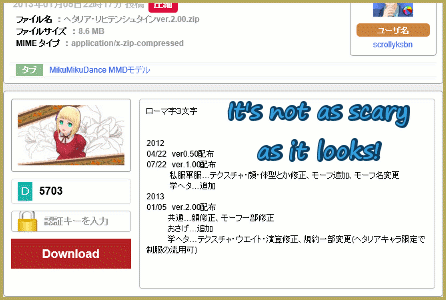
Using the effect is easy. First, download it from Beamman-P’s web page. You can find his page here: http://www43.atwiki.jp/beamman/ Scroll down some to find it. The title is “当たり判定付きふかふか草むら”, and it shows a picture of a character from Touhou standing in a field of grass. Underneath it are two links; one goes to NicoNicoDouga, and one goes to GetUploader. Click the one on the right, which says “ダウンロード”. This takes you to GetUploader. Look down, and you’ll see a button with the same text. Click that, then save it to wherever you keep your effects.Beamman's Grass Effect really adds life to your animation! LearnMMD.com
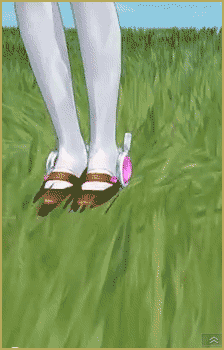
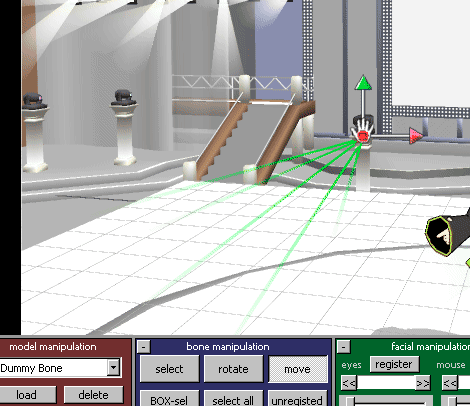
Now it’s time to try out Beamman’s Grass Effect! In MMD, go to the camera/light/accessory editor. Click the load accessory button, and find the folder where you put the effect. There should be one .x file in there. Load up that, and you should see the grass. From here you can change the size and position of the patch of grass. For fine-tuning, you can attach it to a dummy bone and move it where you need it. You can now add your model, or if you prefer to do that first, that’s fine too.

Now press play. Ta-da!! You should see the grass waving gently, and little ripples in the grass as your model moves. Fancy, nee? That’s all there is to it. This effect can be a lot of fun to play around with. Note: This may take a while to render depending on your computer’s capabilities and how many models and effects you have running. If you try and do to much, you might even crash MMD, so be aware of this and don’t overdo it. Other than that, this effect is quite useful and fun. Enjoy it!


– SEE BELOW for MORE MMD TUTORIALS…


— — —


– _ — –


Visit the LearnMMD.com Homepage! Plenty of Mikumikudance instruction and info!

More MMD Tutorials...

How to use Beamman's Bomb Effect in MMD 7.39 MME

How do I use Beamman's Bomb Effect in MME MMD 7.39? Where can I get ...read more

Download MME v037 in English install MikuMikuEffects special effects

Where do I go to download MME for MikuMikuDance? How do I install MikuMikuEffects in ...read more

Playing with MME Effects - Using MikuMikuEffects for MMD

How do I use special effects in mikumikudance? Where do you go to get MME ...read more

Beamman's Grass Effect, Stella The Alchemist, Using MME Effects Tags:mikumikudance, MME Effects Tutorials

Post navigation

Previous Post: Download MMEffects v037 on LearnMMD’s Downloads Page! MME
Next Post: Announcing The 2013 Momi Cup Celebration.

Related Posts

  • LearnMMD.com _ MikuMikuDance MMD Tutorials
    Almost Photo-realistic renders in MMD using Shaders and Effects Advanced Shader Technique
  • Download MME v037 in English install MikuMikuEffects special effects Download MME MikuMikuEffects
  • Luka Loves the Rainbow Ring
    Use MME Rainbow Ring Effect in MikuMikuDance ARIZONA
  • Haku sees things in black and white with the Manga Shader Effect
    Using The Manga Shader Effect for MikuMikuDance ARIZONA
  • Toon Shader modifies shadows and highlights! GloriaTheAnimator
  • MMD Download Japanese Models for MikuMikuDance Downloading New Models

More Related Articles

The Falling Heart Effect is just a wonderful effect ... gorgeous! Playing with MME Effects – Using MikuMikuEffects for MMD Blizzard Effect
The SSAO effect adds depth of color and shadows for greater realism! MME MMD 7.39 Playing with MME – Using MORE cool MikuMikuEffects! Nuts & Bolts
Creating Black Model Silhouettes in MikuMikuDance ARIZONA
Using the AdultShader Effect In MikuMikuDance Adult Shader effect
Making MikuMikuDance Pictures Render to Picture File Tutorial Camera Motion
.spa VS .sph sphere texture file types in PMDE / MikuMikuDance MMD. PMD Editor Basics: .SPH and .SPA Files Add Sparkle! PMDE/PMXE tutorials

Comments (27) on “MME Beamman’s Grass Effect Creates Realistic MMD Landscapes”

Comments navigation

Newer comments
  1. Pandoraisa says:
    April 20, 2014 at 12:23 pm

    I wanna use this effect, but if I do, It wont move! D: please help me ;-;

    Reply
  2. Winter says:
    April 19, 2014 at 9:44 pm

    The texture doesn’t appear in MMD , the grass is white
    Does any body had such problem ?
    My MMD works fine all the time :(

    Reply
  3. Spike says:
    March 30, 2013 at 5:13 pm

    I tried that, but it still says,” I’m supposed to MOVE? No one told me that.”

    Reply
  4. WeActOnImpulse says:
    March 30, 2013 at 9:59 am

    @Spike, Physical Operation > Anytime

    Reply
  5. Spike says:
    March 28, 2013 at 10:46 pm

    My grass just wants to be spikes. What do I do? (If it appears twice, I never got the first e-mail saying to confirm I’m human, so this is my second attempt.)

    Reply
  6. Spike says:
    March 28, 2013 at 10:42 pm

    My grass just wants to be spikes. What do I do?

    Reply
  7. Stella the Alchemist says:
    January 1, 2013 at 8:39 pm

    You’re welcome. Good luck with your problem!

    Reply
  8. Anonymous says:
    January 1, 2013 at 7:36 pm

    It is ok, thanks for trying to help :)

    Reply
  9. Stella the Alchemist says:
    January 1, 2013 at 7:33 pm

    That’s odd. My guess is it’s some sort of graphics card problem or something. I don’t know, sorry. D:

    Reply
  10. Anonymous says:
    January 1, 2013 at 7:29 pm

    I tried using Animasa Miku and I still had problems with the grass effect.

    Reply
  11. Stella the Alchemist says:
    October 22, 2012 at 11:02 am

    I think FA is right. Have you ever had problems with the model before? It sounds like a physics problem to me. It may be that the grass physics and the model physics are colliding in some unusual way. Try a different model and see what happens.

    Reply
  12. WeActOnImpulse says:
    October 22, 2012 at 8:44 am

    @LuluGirl122
    I’m pretty sure it has to do with the physics on the model you’re using. Just close MMD, then re-load everything but instead of using the model that glitches use Animasa Miku. If it’s still messed up I might know what to do.

    Reply
  13. LuluGirl122 says:
    October 21, 2012 at 10:42 am

    It doesn’t work for me. The grass moves fine but there is a bug where it goes all over everything on the screen!!
    :(

    Reply
  14. WeActOnImpulse says:
    October 12, 2012 at 1:17 pm

    This effect is awesome nice tutorial

    Reply
  15. Arizona says:
    October 2, 2012 at 7:32 pm

    Kewl! I don’t have this effect. I want to try it out now!
    Good job Stella!

    Reply

Comments navigation

Newer comments

Leave a Reply Cancel reply

Your email address will not be published. Required fields are marked *

Download the latest version of MikuMikuDance!
See the MMD Step-by-Step instructions page!
Learn how to make your own MMD motions!
LearnMMD.com
  • Top-10 Best “motion-maker” MMDers on YouTube Intro to MikuMikuDance
  • Give the Animasa Teto Chimera a wing flapping motion in MMD 7.39
    Create Wing Flapping Motion for Teto Chimera MMD 7.39 Creating Motions
  • Gakupo sings "Trick Bag" - VDE-3 Entry!
    Step 1: VDE-3 “Gotta Sing… Gotta Dance!” Entry Creation… YouTube Music Approval CONTESTS
  • Reader asks how to create MMD artwork… stuff like posing, camerawork? MMD Basics
  • LearnMMD Stage Lit with AutoLuminous Lights MMD Tutorials
  • Kasane Teto with Beamman's Simple Magic Explosion2 positioned behind her
    Beamman’s SimpleMagic creates Explosions, Fire-Balls and Swirling Flames! Beamman's SimpleMagic
  • LearnMMD.com is back online after SIX days off!
    LearnMMD.com is BACK ONLINE, again! Reggie Dentmore
  • Using the Beamman’s Digital Ripple Effect Digital Ripple

Copyright © 2022 Learn MikuMikuDance – MMD Tutorials – Free 3D Animation Software and Instructions..

Powered by PressBook Premium theme

Go to mobile version