Skip to content
Learn MikuMikuDance – MMD Tutorials – Free 3D Animation Software

Learn MikuMikuDance – MMD Tutorials – Free 3D Animation Software

Download Free Animation Software – Let's Learn How to Do Everything!

  • Step-by-Step MMD instructions
  • DOWNLOADS
  • Troubleshoot, Fix MMD
  • Site Contents
  • Reggie Replies Q&A
  • Homework!
  • What IS MMD?
    • Download MikuMikuDance Newest Latest Version of MMD
  • “HOW TO”
    • Raycast RAY-MMD Effect Tutorials
  • BONUS PAGES
    • Why convert PMD models to PMX?
  • HALL of CHAMPIONS
  • Tutorial Categories
  • About
    • Privacy Policy
  • Toggle search form
  • Ray-MMD environment controls create MMD dreamscape MMD Tutorials
  • Welcome to Nico Seiga, Nico Nico’s art page! HollyLawliet
  • Create MMD Abstract Art from Low-Res Videos! MMD Tutorials
  • Use the PMXE Transform Window to edit your MMD models! Accessory Manipulation/Adjust
  • Export Import MMD Models Using Blender and PMXE Blender
  • Making JRPG style scenes using MMD MMD Comics
  • A MikuMikuDance Beginner’s Easy First Dance Intro to MikuMikuDance
  • Inspired by MMD, Draw Miku blending 2D and 3D Art! MMD Fine Art

Let your MMD model breathe and move while standing still!

Posted on April 29, 2016January 19, 2017 By MMD-Anime-Bunny 4 Comments on Let your MMD model breathe and move while standing still!

A feature article written by LearnMMD's MMD-Anime-Bunny!How do I make my MMD model breathe? How do I make a natural breathing motion in MikuMikuDance? Why do my models look lifeless when they are standing or sitting in my MMD animations?

Let your MMD model breathe and move
while standing still!

Hello again!~~~~
Bunny here~
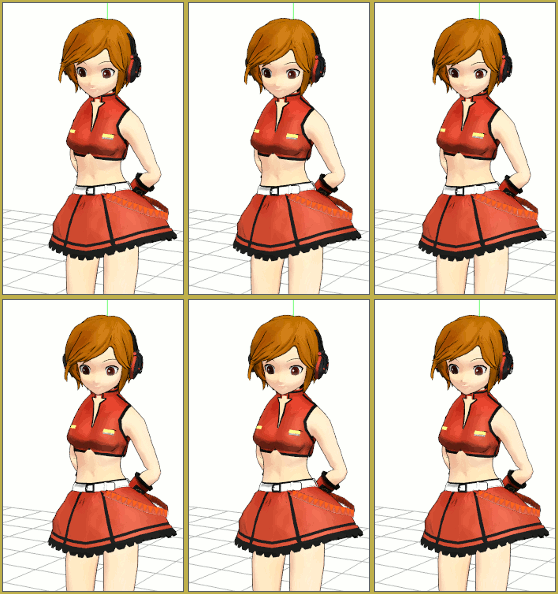
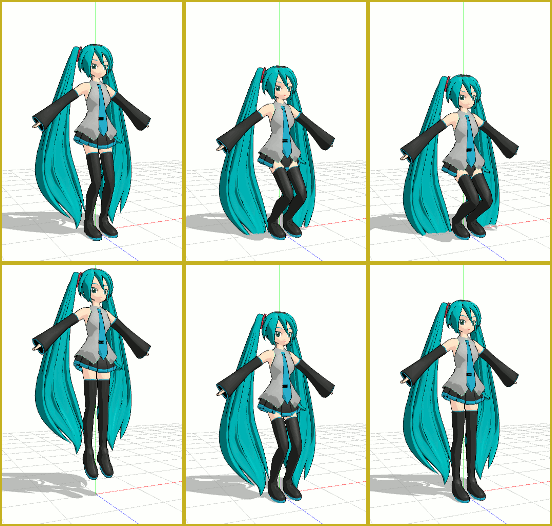
Make yout models breathe... The littlest motions make a big difference in what your eyes and mind percieve as a living being VS a static cartoon.So, I’ve two tips to help make your animation’s model motions more realistic when they’re moving!

1). Make the model breathe in and out
2). Add a little static-motion (Because you never exactly stand still)

BUT, you do need to use the interpolation curve for all of these, here’s a tutorial that TaiGaO made: https://learnmmd.com/http:/learnmmd.com/lmake-smooth-motion-interpolation-curves
You will want to set the curve for a smooth entry and smooth exit for each motion. Try to get the interpolation curve like this:
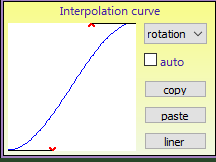
Use this gentle interpolation curve for ALL of these gentle motions.(Use this one for all the frames, for both options)

So let’s start with Breathing!

Okay, so your model stands completely still at the moment?
Just follow these instructions~

1. Go 60 frames forward and rotate the back bones (upper body) a teeny tiny bit to the back, also rotate the shoulder bones a little bit up on the same frame (Don’t forget the interpolation curve).
Now go 2 frames forward and rotate the head bone a bit downwards so the eyes look at the camera (you).

2. Now go 60 frames forward again, and rotate the back bones a bit forward and the shoulders down again.
Also, go 2 frames forward again and rotate the head to it’s normal position (Facing you) (Interpolation curve!)

3. Repeat step 1 and 2 for as long as needed.

Static Motion… involuntary motions while standing still

1. Go approx. 40-80 frames forward, rotate the back bones a bit in whichever way you like. (To the side, backwards, forwards)
And go 4-6 frames further and rotate the head bones to the camera. (Interpolation curce again!)
2. Go approx. 40-80 frames further, and rotate the bones again like in step 1.

3. Repeat step 1 and 2 for as long as needed.

Fin

So that was my quick tutorial on making your models seem more alive! Soon I’ll make a tutorial about making smooth animation!~

Good luck with MMD’ing~ ;3

~ Bunny


– SEE BELOW for MORE MMD TUTORIALS…


— — —


– _ — –


Visit the LearnMMD.com Homepage! Plenty of Mikumikudance instruction and info!

More MMD Tutorials...

Enjoy the "camera Angles WEIRD in Anime" meme...

Enjoy the "camera Angles WEIRD in Anime" meme... This image is from The Slayers - NEXT, ...read more

Reader asks how to create MMD artwork... stuff like posing, camerawork?

A reader asks... Is there a tutorial on how to create MMD artwork, like those you ...read more

Learn MikuMikuDance in Small Steps! New LearnMMD Video Series

Learn MikuMikuDance in Small Steps. Where can I find easy-to-follow MMD instructions on YouTube? How ...read more

Apply Multiple Effects on an Entire MMD Model Using M4Layer Effect

How can I apply multiple effects to an MMD model? Can I use more than ...read more

MMD Plugin Manager... I Found a Treasure!

What sorts of MMD Plugins are there? MMD Plugin Manager? MMD Plugins. Plugin MMD. More ...read more

2025: Hatsune Miku is 18... but she is designed to be always 16 Years. Old by design and in reality!

Finally, in 2023, Hatsune Miku is 16 years old! but in August of 2025, she ...read more

Creating Motions, Making Smooth Motions, MMD Tutorials, MMD-Anime-Bunny, Random Thoughts & Visions

Post navigation

Previous Post: Creating MMD Diva Performance Animations – An Overview
Next Post: Make an MMD Music Video Bo Beep Bo Beep!

Related Posts

  • Make a “Dream Fighter” MMD Music Video "the making of" my video
  • Staging and the 12 Principles of Animation. Accessory Manipulation/Adjust
  • PocketMQO(with MMD) MikuMikuDance in an Android environment! MMD Tutorials
  • MMD "Kiss Me" free download motion and WAV files.
    Ten year old MMD “Kiss Me” animation LOOKS like NEW! "the making of" my video
  • Make Your YouTube Channel Popular with Engrossing Introductions MMD Basics
  • Bandizip® keeps Japanese file names intact when Extracting ZIP folders Bandizip

More Related Articles

Breathing “SOUL” into MMD models and scenes using Fine Art Techniques Advanced Shader Technique
The MMD Pity Partry motion is free to download! MiyukiOhayashi’s Pity Party motion download includes WAV "the making of" my video
Ray-MMD: Lost in the Fog Ray-MMD Localized Fog Effects for stunning MMD scenes MMD Tutorials
Hatsune Miku “LIVE” on David Letterman’s ‘The Late Show’ Random Thoughts & Visions
My Top 6 Favorite Shader Effects for MikuMikuDance GloriaTheAnimator
Beamman's WEater Effect can be very realistic. BeamMan’s Water Effects really look wet! Beamman's Water v5

Comments (4) on “Let your MMD model breathe and move while standing still!”

  1. Rizqi Aditya says:
    December 24, 2018 at 10:25 pm

    what kind of software u using to create model and animated it sir?

    Reply
    1. KillerBeer says:
      December 25, 2018 at 4:54 am

      https://learnmmd.com/StartHere/Steps5.html

      Reply
  2. AnonKanon says:
    May 2, 2016 at 3:04 pm

    I cant use effects,Can help me

    Reply
    1. Angie says:
      August 20, 2016 at 7:26 pm

      Have you tried downloading MME yet?

      Reply

Leave a Reply Cancel reply

Your email address will not be published. Required fields are marked *

Download the latest version of MikuMikuDance!
See the MMD Step-by-Step instructions page!
Learn how to make your own MMD motions!
LearnMMD.com
  • My new MMD Action Video was fun to make! "the making of" my video
  • Translate Japanese Models to English with Google Translate and PMDE Bones
  • Squash and Stretch Ball
    The 12 Principles of Animation for MikuMikuDance. ARIZONA
  • Take full control of MME Effects by editing .fx files Beamman's Burner effect
  • Creating an animation using MMD, MikuMikuDance! "the making of" my video
  • Luka with Body Pane with Vignette
    Hair Falling through the Body in MMD Models and How to Fix It Fixing Broken Models
  • What kind of laptop should I buy for running MMD? Random Thoughts & Visions
  • VDE-4 Champion: Kazumi "the making of" my video

Copyright © 2022 Learn MikuMikuDance – MMD Tutorials – Free 3D Animation Software and Instructions..

Powered by PressBook Premium theme

Go to mobile version