Skip to content
Learn MikuMikuDance – MMD Tutorials – Free 3D Animation Software

Learn MikuMikuDance – MMD Tutorials – Free 3D Animation Software

Download Free Animation Software – Let's Learn How to Do Everything!

  • Step-by-Step MMD instructions
  • DOWNLOADS
  • Troubleshoot, Fix MMD
  • Site Contents
  • Reggie Replies Q&A
  • Homework!
  • What IS MMD?
    • Download MikuMikuDance Newest Latest Version of MMD
  • “HOW TO”
    • Raycast RAY-MMD Effect Tutorials
  • BONUS PAGES
    • Why convert PMD models to PMX?
  • HALL of CHAMPIONS
  • Tutorial Categories
  • About
    • Privacy Policy
  • Toggle search form
  • Stationary Motion Creation rights and wrongs Creating Motions
  • Click to see FULL SIZE my original model setup for my "Dueling Banjos".
    Planning a MikuMikuDance 7.39 Dueling Banjos Animation Google SketchUp and MMD
  • Keep the Center-Bone when adding Mother-Bone to an older model MMD Tutorials
  • Pose characters in PMX Editor and export as OBJs for Poser .OBJ Object Files
  • How to make multi-part videos in MikuMikuDance Animation Shortcuts
  • MMD Project “I WANNA PARTY!” features great motion files by o Savvy o "the making of" my video
  • MikuMikuDance “Keep the Faith-MMD” MMD Tutorials
  • Ray-MMD LED widget replaces MMD screen capture widget Add Background Pictures and AVI

Translate Japanese Models to English with Google Translate and PMDE

Posted on March 13, 2013August 15, 2020 By xxbodger 1 Comment on Translate Japanese Models to English with Google Translate and PMDE

Feature articles by LearnMMD's xxbodger!Help! My new MMD model has no English bone names and is missing all of the Facial adjustments! Why are the Facial adjustments blank? Why can I see the facials only in Japanese mode?

Recover English Bone Names …

Translate Japanese Models into English!

Your Japanese PMD models will be so much easier to use!
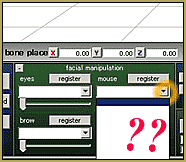
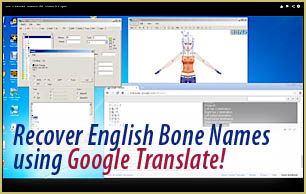
Often a Japanese PMD model will have no English bone names. Translate Japanese models into English. MMD LearnMMD.com

Have you ever noticed missing facials when you load a Japaneses model into the English version of MMD? Or have you ever wanted to attach an accessory to a particular bone… and all you find is a long list of Japanese names… Or an incomplete list… or no list at all!?

There is a simple way to fix that!

Well… “Simple” once you have done it a few times! In order to translate Japanese models into English, you will need to have the English version of PMDE. Using Google Translate and PMD Editor, you can rename the bones with English names. Here is a link to my video tutorial: https://www.youtube.com/watch?v=RckyGc8XeMA

The method is pretty straight-forward… and surprising!

You navigate through the lists of Japanese bones in PMDE, copy/paste entire lists at a time into the window at translate.google.com with the translator set to translate Japanese into English. The result is a list of bone names in English. You can then copy/paste that bone list into the appropriate PMDE window … and you’re done! Watch the video to learn how to recover the Japanese bone names and translate Japanese models into English.Please watch my Video Tutorial (above) and be sure to follow-along, carefully. Also be sure to rename your new English model BEFORE you SAVE anything, so that your original model will stay safe.

– SEE BELOW for MORE MMD TUTORIALS…


— — —


– _ — –


Visit the LearnMMD.com Homepage! Plenty of Mikumikudance instruction and info!

More MMD Tutorials...

Reader asks how to create MMD artwork... stuff like posing, camerawork?

A reader asks... Is there a tutorial on how to create MMD artwork, like those you ...read more

MikuMikuDance 15th Anniversary celebration video posted on NicoNico!

Did you know that the first version of MikuMikuDance was released in 2008? MMD is ...read more

Use YouTube Video Analytics Attract Maintain Viewers

How can I use YouTube Video Analytics to learn how to make popular MMD videos? ...read more

Create 450-Frame MMD animation from scratch!

How do I create a 450-Frame MMD animation from scratch? How do I start making ...read more

No more boring MMD Camerawork - Keep it moving!

MMD Camerawork can be so boring. How can I add life to my MMD animations? ...read more

Download Halloween Costume TDA Miku edit by dA's Shiro-NekoVocaloid

Where can I get Halloween Costume TDA Miku? Download a gang of five MMD models ...read more

Bones, Fixing Broken Models, Fixing Facial Names, MMD Basics, Translate Japanese Models, xxbodger

Post navigation

Previous Post: Using the SpotLight Effect in MikuMikuEffects
Next Post: Create MMD Lip-Sync Animation as a Separate File

Related Posts

  • MMD Camerawork makes your video exciting!
    No more boring MMD Camerawork – Keep it moving! Camera Motion
  • Fia Phoenix’s Deviantart Spotlight Downloading New Models
  • Rules for Common MMD Models
    Rules of Common MMD Models and How to NOT Break Them Keep the Faith-MMD Credits/Sharing
  • Make Smooth Motions using Multiple Keyframes Animation Shortcuts
  • Create 450-Frame MMD Animation from scratch!
    Create 450-Frame MMD animation from scratch! "the making of" my video
  • Download MMD Pokeball Accessory and Learn Accessory Manipulation Accessory Manipulation/Adjust

More Related Articles

Use YouTube Video Analytics to Attract and maintain viewers! Use YouTube Video Analytics Attract Maintain Viewers "the making of" my video
ZERO-GRAVITY Day on the beach in MMD!. Use Gravity Settings and Noize to make winds blow. Using the Gravity Settings in MikuMikuDance ARIZONA
“The making of ” any of my videos starts with these considerations… "the making of" my video
Make a Music Video with MMD and Learn to Use MMD "the making of" my video
Easy Fun MMD Music Video Mahlazer Motion Download “Feel the Sound” MMD Basics
Post Effect cannot be specified Fix the “Post Effect cannot be specified” error Chris no Akumu

Comment (1) on “Translate Japanese Models to English with Google Translate and PMDE”

  1. Paprika kawashima says:
    September 20, 2014 at 6:13 pm

    Thank u for this tutorial it helped me a lot!!!!!!!!!!

    Reply

Leave a Reply Cancel reply

Your email address will not be published. Required fields are marked *

Download the latest version of MikuMikuDance!
See the MMD Step-by-Step instructions page!
Learn how to make your own MMD motions!
LearnMMD.com
  • Exporting VSQX to VSQ for MMD! Kazuki Matsuoka
  • MikuMikuDance MMD Cage Stage Tutorial Downloading New Models
  • The Making of: Sleepover Gone Wrong (REMAKE) "the making of" my video
  • Download Reggie’s Cafeteria Table and Chair accessory! New Stage Accessory
  • Using the Beamman’s Digital Ripple Effect Digital Ripple
  • When you add background AVI files, you can motion trace!
    Loading Background AVI Files into MMD (2021 Edition) Add Background Pictures and AVI
  • MikuMikuDance Welcomes Luka Megurine to MMD 8.10! Download MikuMikuDance
  • UTAU Splash Screen
    Making VSQ Files Without VOCALOID Using UTAU Mae Blythe

Copyright © 2022 Learn MikuMikuDance – MMD Tutorials – Free 3D Animation Software and Instructions..

Powered by PressBook Premium theme

Go to mobile version