
Skip to content
Learn MikuMikuDance – MMD Tutorials – Free 3D Animation Software

Learn MikuMikuDance – MMD Tutorials – Free 3D Animation Software

Download Free Animation Software – Let's Learn How to Do Everything!

  • Step-by-Step MMD instructions
  • DOWNLOADS
  • Troubleshoot, Fix MMD
  • Site Contents
  • Reggie Replies Q&A
  • Homework!
  • What IS MMD?
    • Download MikuMikuDance Newest Latest Version of MMD
  • “HOW TO”
    • Raycast RAY-MMD Effect Tutorials
  • BONUS PAGES
    • Why convert PMD models to PMX?
  • HALL of CHAMPIONS
  • Tutorial Categories
  • About
    • Privacy Policy
  • Toggle search form
  • Make Wattpad covers using MikuMikuDance and Canva.com! Faris
  • The MME Otome effect adds a fantasy cloud of bubbles and sparkles.
    Otome effect yields bubble and sparkle psychedelia Otome
  • Using the MME ColorShift Effect in MikuMikuDance ARIZONA
  • Get started with MMM – The Basics Kazuki Matsuoka
  • IrfanView captures single-frame images from Video AVI files! Irfanview Media Viewer
  • Adjust downloaded motions to fit your MMD models Animation Shortcuts
  • How to fix a model with missing textures Fixing Broken Models
  • The FILE Menu Options MENU Option Descriptions

Beamman’s Breath Effect shows warm breath in winter

Posted on July 16, 2016July 4, 2024 By Reggie_Dentmore 4 Comments on Beamman’s Breath Effect shows warm breath in winter

A Feature Article by Reggie Dentmore on LearnMMD.comHow do I use Beamman’s Breath Effect? Why don’t I see anything when I load Beamman’s Breath Effect?

Beamman’s Breath Effect v1.1
shows warm breath in winter…
… and a FIRE BREATH anytime!
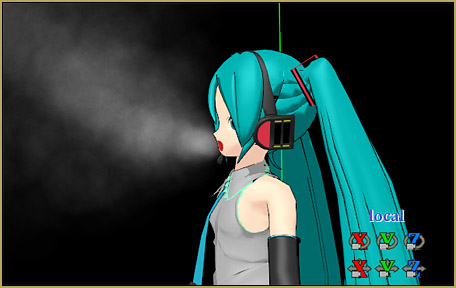
Beamman's Breath Effect generates a nice little warm-breath fog... that fluctuates with your model's mouth movements!

A reader asked me, today, about Beamman’s Breath effect. I had to fiddle with it, a little, before I discovered the trick.

The reader referenced atutorial on dA and gave a link for the effect download. The link she Get Beamman's Breath effect v1.1 from the Beamman Effects page!gave was for an older version, 1.0… and when I went to Beamman’s atwiki page I found version 1.1

Either version worked well for me… but the 1.1 version includes FIRE BREATH… so that’s the one to get!

Gotta edit the effect, first…

Yup… you have to customize the effect for your particular model. The FX file needs to know which model you are using.

Replace the existing model name with the EXACT file name of YOUR model.

The edit is simple. First, go into your Model folder, inside your UserFolder in MMD, and copy the file name of the model you want to use. This edit needs the exact file name of your model. Then, navigate to your BREATH effect folder and “Open With” the Breath.fx file using Notepad or Notepad++… and in the third line, or so, of text you will see where to replace the old model name with your new model’s name. Then, Save and close the file.

Let’s breath some fog!

For a quick test, Open MMD, Load your model, go to a Black Background in the Background menu, go to Camera mode, and Load the effect: Breath.x

You probably won’t see anything… you need to adjust the effect so it is attached to your For a quick test of Beamman's Breath Effect, set the Si size to 11 and open your model's mouth!model’s head bone. And, for this test, set the Si to 11… ! NOW… you probably STILL won’t see anything! Go back to your Model and open her mouth Aaaaah… and see all the fog!

The Breath effect is coupled to the model’s mouth! As you open and close the mouth, the “breath” increases and diminishes, accordingly!

The effect seems to “not work” until you start flapping your model’s jaws.

Focus, Pinkie, focus…

The key to the use of this effect is in the Accessory Manipulation adjustments. Adjust the Accessory Manipulation settings to control Beamman's Breath effect.To get the fog to go “forwards”, set the Rx to -90… to raise the fog to the model’s mouth area, increase the Y setting a little: like .2 … and to move the fog away from the center of the head, set the Z to about -1.2 or so.

I also adjusted the Si to only .8 for this picture… more than that made it look like she was on fire!

Speaking of fire…

Inside your Breath Effect v1.1 folder is FireBreath.x … FIRE BREATH effect is included in Beamman's Breath Effect v1.1a fire breath effect!

It works the same as Breath… you need to edit the .fx file with the exact file name of your model.

The Si size and the other settings are important to making this effect look right.

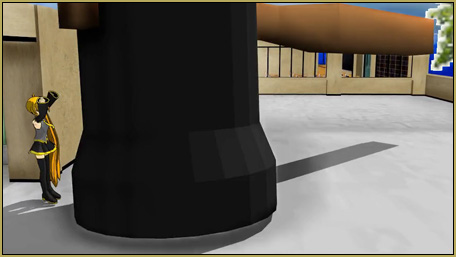
One of the odd things about this effect is that it really only works from a side view of your model! As you swing the camera around, you will see how the effect isn’t really coming out of the model’s mouth. From different points of view, it’s all over the place.

Multiple models on a January evening…

I haven’t tried this, myself, but I imagine you can rename the effect’s files so you can have multiple instances of it onscreen at the same time… one for Miku, one for Rin, one for Kaito, and so forth. You would name both the .x and .fx files with the same custom name… MikuBreath.x and MikuBreath.fx … something like that should work. This scheme would also let you keep the customized files onhand for your various models.

Have fun with Beamman’s Breath effect!


– SEE BELOW for MORE MMD TUTORIALS…


— — —


– _ — –


Visit the LearnMMD.com Homepage! Plenty of Mikumikudance instruction and info!

More MMD Tutorials...

Introducing MMD model 1052C China Qipao Miku

Where can I download MMD model 1052C dancers? I want the 1052C China Qipao Miku ...read more

Download Jomomonogm's Snow Miku 2019 for MMD, a most unusual model!

Where can I download Jomomonogm's Snow Miku 2019? What is so unusual about this Snow ...read more

MMD animation made-from-scratch Forgotten Vocaloid Mew Rags on Reggie's MMD Videos

How do I make my own MMD animation from scratch? How do I start my ...read more

Rediscover your old MMD Animations: Love them again!

Rediscover your old MMD Animations: Love them again! https://youtu.be/P4b3todZMUI A labor of love... Remember how it was when ...read more

MMD Boobs too Big yields Too Funny Really Bad Boy video!

Can MMD boobs too big get in the way of a downloaded motion file? What ...read more

Download Hatsune Miku type N models from 2010... a set of 6!

Can I still download Hatsune Miku type N models? Where can I download a few ...read more

Beamman's Breath Effect, Beamman's Fire Breath, MME Effects Tutorials, Reggie Dentmore

Post navigation

Previous Post: A better MMD followcam in PMXE with physics and IK bones
Next Post: Use the PMXE Transform Window to edit your MMD models!

Related Posts

  • Sexiest MMD Model Dance Motion you can Download "the making of" my video
  • 15-Second MMD animation “Smash Walkin’ “ "the making of" my video
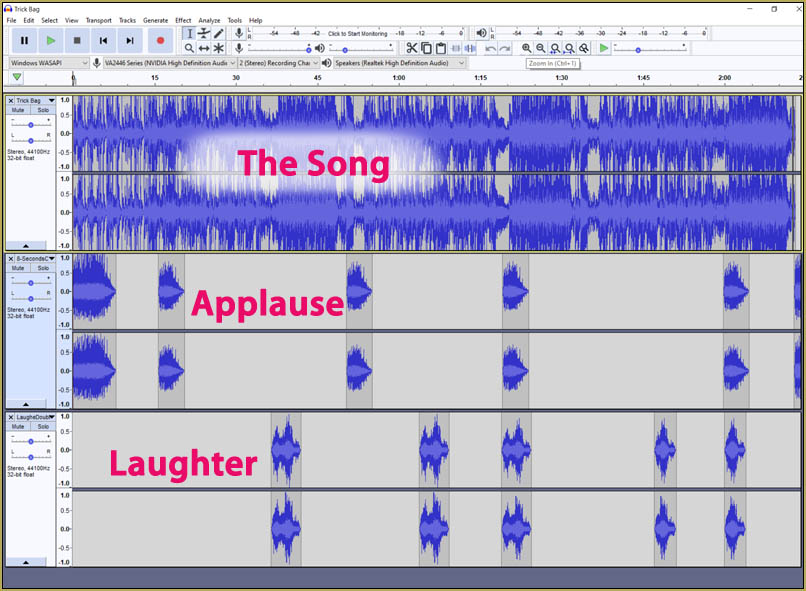
  • I added laughter and applause tracks using Audacity software.
    Add Life to your MMD soundtrack with Laughter and Applause! VDE-3! Making Soundtracks
  • Next Level in MMD Video Evolution
    Post-Production Editing Yields Next Step in MMD Video Quality Making Videos - Rendering to AVI
  • Getting Re-Excited about MikuMikuDance … Happy Birthday Miku! Intro to MikuMikuDance
  • Value of saved poses.
    Saved Poses get your MMD Animation Started! Animation Shortcuts

More Related Articles

DropShadow_dual Creates Two DropShadow Effects at Once! Chestnutscoop
About changing models skirts using PMD Editor PMXE KillerBeer
Everything is loaded and ready to "Play!" ... Happy Hands MMD Meme. Create an MMD Video using the “Happy Hands” Meme Making Videos - Rendering to AVI
Open MikuMikuDance and enjoy it for the fun of it! Open MikuMikuDance… just for the fun of it! MMD Basics
GaussianVariable MME Effect Blurs your entire scene! GaussianVariable
MME Effects Tutorials on LearnMMD.com MMD 7.39 MME Effects Tutorials

Comments (4) on “Beamman’s Breath Effect shows warm breath in winter”

  1. Thaninee says:
    May 21, 2017 at 3:28 am

    It’s say “failed to load effect file”
    When i copy the breath.fx and breath.x

    Reply
    1. KillerBeer says:
      May 21, 2017 at 9:30 pm

      What do you mean by that? Please describe your sequence of actions in more details, step by step. (The “I did it all as per instructions” is *not* an answer if we’re to find out what exactly in instructions you got wrong)

      Reply
  2. Harry says:
    July 27, 2016 at 2:15 am

    Wait, what if you want it on more than one model??

    Reply
    1. KillerBeer says:
      July 27, 2016 at 2:38 am

      …the last paragraph?

      Reply

Leave a Reply Cancel reply

Your email address will not be published. Required fields are marked *

Download the latest version of MikuMikuDance!
See the MMD Step-by-Step instructions page!
Learn how to make your own MMD motions!
LearnMMD.com
  • Using the Beamman’s Digital Ripple Effect Digital Ripple
  • Dramatically Decrease AVI File size before uploading YouTube videos MMD Tutorials
  • MMD Download Japanese Models for MikuMikuDance Downloading New Models
  • Use Proper MMD Etiquette When Using New Models and Accessories Downloading New Models
  • MMD CameraSmoother Tool smooths camera motions! CameraSmoother Tool
  • Using the MME ColorShift Effect in MikuMikuDance ARIZONA
  • Watch the video as I create this MMD animated GIF using GIMP 2.6
    Make MMD Animated GIFs using GIMP 2.6 – MikuMikuDance Animated GIFs
  • Subtex slot for MMD models in PMXE Bandages

Copyright © 2022 Learn MikuMikuDance – MMD Tutorials – Free 3D Animation Software and Instructions..

Powered by PressBook Premium theme

Go to mobile version