
Skip to content
Learn MikuMikuDance – MMD Tutorials – Free 3D Animation Software

Learn MikuMikuDance – MMD Tutorials – Free 3D Animation Software

Download Free Animation Software – Let's Learn How to Do Everything!

  • Step-by-Step MMD instructions
  • DOWNLOADS
  • Troubleshoot, Fix MMD
  • Site Contents
  • Reggie Replies Q&A
  • Homework!
  • What IS MMD?
    • Download MikuMikuDance Newest Latest Version of MMD
  • “HOW TO”
    • Raycast RAY-MMD Effect Tutorials
  • BONUS PAGES
    • Why convert PMD models to PMX?
  • HALL of CHAMPIONS
  • Tutorial Categories
  • About
    • Privacy Policy
  • Toggle search form
  • Easily Create Walk-in-Place Motion in MMD Animation Shortcuts
  • Reset Your Computer to Japanese Locale for perfect Japanese Stella The Alchemist
  • Subtex slot for MMD models in PMXE Bandages
  • PMDE Parts Links help you create your MMD Selfie NOKO2
  • Make LearnMMD Masthead Art for the world to see! Reggie Dentmore
  • Darkening the stage lighting makes the floorlight look very bright! MMD 7.39, LearnMMD.com
    MMD Camera Motions: The Camera’s Gotta Keep Moving! Camera Motion
  • Chimera Teto Emerging into the Light.
    Looking Good with the MME Mirror Water Effect in MMD ARIZONA
  • Speech Synthesizer gives MMD Models a voice! Making Soundtracks

The Making of “Boum Boum Boum”: Everything is More Sophisticated in French

Posted on August 16, 2018December 17, 2018 By Senshi Sun No Comments on The Making of “Boum Boum Boum”: Everything is More Sophisticated in French

Boum Boum Boum is available on LearnMMD! A feature article by LearnMMD's Senshi Sun!How do you make an animation in a language you’re still learning? How is lip sync in MMD affected by different languages? What was the process for making “Boum Boum Boum”? In the summer of 2018, I went to Quebec to learn French in a language immersion program. This program insisted that we talk and write in French as much as we could. I wanted to do some animating while I was there, but the project I was working on at the time was in English. That just would not do. I decided to start another project in French so I could use it to practice French words.

What song could I use?

I listened to many popular French artists I hadn’t heard of, but none of their songs made me think “I should animate this.” Then, I found a video featuring two artists I already knew, Mika and Cœur de Pirate, performing at a festival in Montréal. The song they sang together is called “Boum Boum Boum”. I had listened to it in high school, but it didn’t have a huge impact on me. This duet did. The way Cœur de Pirate’s voice mixed with Mika’s had a certain “Je ne sais pas si c’est les accents ou les paroles, mais le chanson est ben chix!” In other words, I loved it. It was flirty, playful, and fun without being blatant. I could make a video that was equally classy.

Getting Set Up

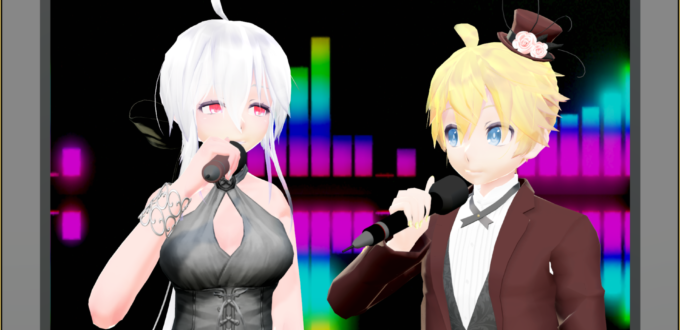
Now that I had a song, I had to find models. I prefer to get models as I need them, so I didn’t have anything that I thought would match the tone of the video. I wanted to find models that were formally dressed. After a bit of hunting, I found xXMoufuMofuXx’s TDA Fancy Len Kagamine and Saryta-chan’s TDA Office Haku V2. These models were dashing, and, honestly, who doesn’t like a person in a nice suit?
Two MMD models in fancy attire.
Everyone likes a nice suit.

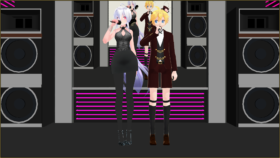
I stopped by Trackdancer’s Deviantart page to download a set of microphones. I already had TD’s nightclub stage. With the characters dressed to the thirty-ones and the set perfectly set up, I was ready to go.

Animation and Lip Sync

I decided to make the animation roughly based on the original video clip. That meant the video would start with just the male (Len) on stage before the female (Haku) arrives. I watched the video a few times, noting the general ways Mika and Cœur de Pirate moved. Those notes formed the basis of my animation. However, I did not want to completely copy the original video, so I didn’t watch the original video once I started animating. My notes were my main guide. Since the main animation was just people standing around and singing, the notes mostly revolved around tone. After the body animation was done, I popped into Face and Lips to animate the mouths. It was fun, but it was probably more difficult than it should have been because I was learning French phonetics. Figuring out which mouth shape goes with which sound can be tricky when you can’t make the sounds yourself. Animating the facial expressions was easy once the lips were synced.

Effects
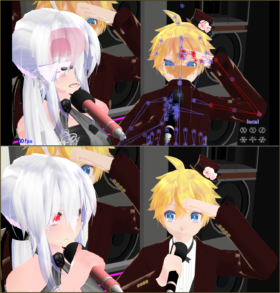
A comparison between an image where items are rendered in the wrong order and a image with the correct order.
Above: What the computer decided to display in the animation window.
Below: What it should look like.
Restarting MMD will fix this issue.

Effects are usually easy for me, but for this video, it seemed I had to fight every step of the way. I had originally planned to use a screen-cast background until I decided that looked too awkward and made a separate video for the background. The video is a combination of VMDSpectrum, WorkingFloor, and partially set-up Raycast. The video’s final dimensions ended up being 480*270 because MMD kept saying it couldn’t read the AVI after a certain point and I figured it was a memory issue. Was it? Who knows, but my hack seemed to work. I used GShader on the main video, as well as ExcellentShader to smooth shadows and DoF to try to make the pixelated-ness of the screen video less noticeable. I had originally planned to add subtitles to the video, with the French lyrics at the top and my own hand-translated English version at the bottom, but I don’t quite have the linguistic capabilities to translate something that complicated at this time.

Watch the video now!

https://www.youtube.com/watch?v=MfNHIhuAQjE Making this has certainly been a learning experience in more ways than I had planned. With each creation, I’m improving. I hope that this experience will help you learn. If you have questions or want advice, leave a comment. I’d be glad to help. Remember to Keep The Faith and credit all of your resources.


– SEE BELOW for MORE MMD TUTORIALS…


— — —


– _ — –


Visit the LearnMMD.com Homepage! Plenty of Mikumikudance instruction and info!

More MMD Tutorials...

Introducing MMD model 1052C China Qipao Miku

Where can I download MMD model 1052C dancers? I want the 1052C China Qipao Miku ...read more

Download Jomomonogm's Snow Miku 2019 for MMD, a most unusual model!

Where can I download Jomomonogm's Snow Miku 2019? What is so unusual about this Snow ...read more

MMD animation made-from-scratch Forgotten Vocaloid Mew Rags on Reggie's MMD Videos

How do I make my own MMD animation from scratch? How do I start my ...read more

Rediscover your old MMD Animations: Love them again!

Rediscover your old MMD Animations: Love them again! https://youtu.be/P4b3todZMUI A labor of love... Remember how it was when ...read more

MMD Boobs too Big yields Too Funny Really Bad Boy video!

Can MMD boobs too big get in the way of a downloaded motion file? What ...read more

Download MMD CyberMiku Black ver1.5 with Glowing Wings and an attitude!

Download MMD CyberMiku Black ver1.5 with Glowing Wings and an attitude to match! A treasure... Yesterday I ...read more

"the making of" my video

Post navigation

Previous Post: Learn to Edit MMD Effects by Editing Raycast Materials
Next Post: The making of: “Bang Bang” Portal video

Related Posts

  • Create 450-Frame MMD Animation from scratch!
    Create 450-Frame MMD animation from scratch! "the making of" my video
  • NCH VideoPad Video Editor
    VideoPad Video Editor Free Download from NCH Software "the making of" my video
  • Typical MikuMikuDance MMD Download Project: Lucky! "the making of" my video
  • Beautiful CyberMiku Black ver1.5 has wings!
    Download MMD CyberMiku Black ver1.5 with Glowing Wings and an attitude! "the making of" my video
  • MMD Project “I WANNA PARTY!” features great motion files by o Savvy o "the making of" my video
  • Creating an animation using MMD, MikuMikuDance! "the making of" my video

More Related Articles

Beautiful CyberMiku Black ver1.5 has wings! Download MMD CyberMiku Black ver1.5 with Glowing Wings and an attitude! "the making of" my video
The Zombie Song download for MMD is a lot of fun! Zombie Song download easily makes spooky MMD videos! "the making of" my video
Make MMD Background AVI using WAV and AviUtl Make MMD Background AVI Using AviUtl WMV Files "the making of" my video
“Behind the Scenes” of My Miku Likes Cheese Video! "the making of" my video
My First MMD Video – After Struggling with Blender, MMD was Easy "the making of" my video
Make an MMD Music Video Bo Beep Bo Beep! "the making of" my video

Leave a Reply Cancel reply

Your email address will not be published. Required fields are marked *

Download the latest version of MikuMikuDance!
See the MMD Step-by-Step instructions page!
Learn how to make your own MMD motions!
LearnMMD.com
  • How To Make Global Lighting Work with Game-Rips Fixing Broken Models
  • MME Effects Tutorials on LearnMMD.com MMD 7.39 MME Effects Tutorials
  • Video Dojo Expo 2 CHAMPIONS are chosen! CONTESTS
  • Free AVIUTL Video Editing software adds animated titles to MMD Videos! Animated Titles
  • Use the PMXE Transform Window to edit your MMD models! Accessory Manipulation/Adjust
  • The Cheaplens Effect is easy to use and very powerful!
    MME CheapLens Effect controls the “Look” of your MMD video CheapLens Effect
  • First Steps for the Beginner MMD MikuMikuDance artist Welcome to LearnMMD.Com!
  • Dummy Bones Hold Accessories in MikuMikuDance Dummy Bones

Copyright © 2022 Learn MikuMikuDance – MMD Tutorials – Free 3D Animation Software and Instructions..

Powered by PressBook Premium theme

Go to mobile version