

Skip to content
Learn MikuMikuDance – MMD Tutorials – Free 3D Animation Software

Learn MikuMikuDance – MMD Tutorials – Free 3D Animation Software

Download Free Animation Software – Let's Learn How to Do Everything!

  • Step-by-Step MMD instructions
  • DOWNLOADS
  • Troubleshoot, Fix MMD
  • Site Contents
  • Reggie Replies Q&A
  • Homework!
  • What IS MMD?
    • Download MikuMikuDance Newest Latest Version of MMD
  • “HOW TO”
    • Raycast RAY-MMD Effect Tutorials
  • BONUS PAGES
    • Why convert PMD models to PMX?
  • HALL of CHAMPIONS
  • Tutorial Categories
  • About
    • Privacy Policy
  • Toggle search form
  • Featured-translate-japanese-models
    Translate Japanese Models Using PMXEditor’s Batch Name Editor Trackdancer2015
  • MMD Dummy Bones may be your most important models! Dummy Bones
  • Proper Computer DPI Scaling Setup Stops Text Cut Off in PMXE Mae Blythe
  • Register often to get sharp, crisp lip-sync animation movements. LearnMMD,com MMD 7.39
    Create MMD Lip-Sync Animation as a Separate File Creating Motions
  • How to tame unruly skirts: fix fluttering parts in MMD 9.xx+ Fixing Broken Models
  • MME Effects Tutorials on LearnMMD.com MMD 7.39 MME Effects Tutorials
  • Animate MMD ballet pirouette motion Creating Motions
  • Translate Japanese Model Names into English File Management / Organization

The Making of “Boum Boum Boum”: Everything is More Sophisticated in French

Posted on August 16, 2018December 17, 2018 By Senshi Sun No Comments on The Making of “Boum Boum Boum”: Everything is More Sophisticated in French

Boum Boum Boum is available on LearnMMD! A feature article by LearnMMD's Senshi Sun!How do you make an animation in a language you’re still learning? How is lip sync in MMD affected by different languages? What was the process for making “Boum Boum Boum”? In the summer of 2018, I went to Quebec to learn French in a language immersion program. This program insisted that we talk and write in French as much as we could. I wanted to do some animating while I was there, but the project I was working on at the time was in English. That just would not do. I decided to start another project in French so I could use it to practice French words.

What song could I use?

I listened to many popular French artists I hadn’t heard of, but none of their songs made me think “I should animate this.” Then, I found a video featuring two artists I already knew, Mika and Cœur de Pirate, performing at a festival in Montréal. The song they sang together is called “Boum Boum Boum”. I had listened to it in high school, but it didn’t have a huge impact on me. This duet did. The way Cœur de Pirate’s voice mixed with Mika’s had a certain “Je ne sais pas si c’est les accents ou les paroles, mais le chanson est ben chix!” In other words, I loved it. It was flirty, playful, and fun without being blatant. I could make a video that was equally classy.

Getting Set Up

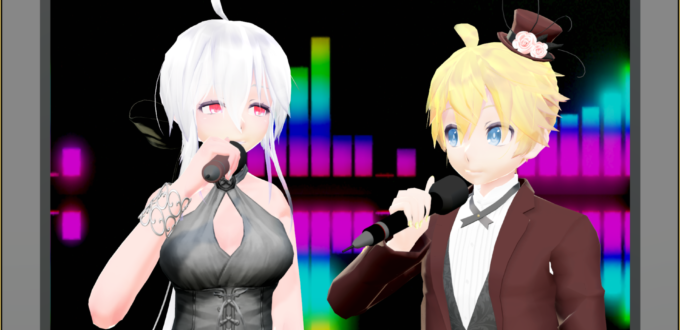
Now that I had a song, I had to find models. I prefer to get models as I need them, so I didn’t have anything that I thought would match the tone of the video. I wanted to find models that were formally dressed. After a bit of hunting, I found xXMoufuMofuXx’s TDA Fancy Len Kagamine and Saryta-chan’s TDA Office Haku V2. These models were dashing, and, honestly, who doesn’t like a person in a nice suit?
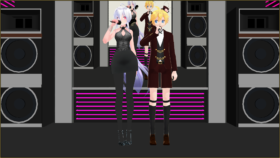
Two MMD models in fancy attire.
Everyone likes a nice suit.

I stopped by Trackdancer’s Deviantart page to download a set of microphones. I already had TD’s nightclub stage. With the characters dressed to the thirty-ones and the set perfectly set up, I was ready to go.

Animation and Lip Sync

I decided to make the animation roughly based on the original video clip. That meant the video would start with just the male (Len) on stage before the female (Haku) arrives. I watched the video a few times, noting the general ways Mika and Cœur de Pirate moved. Those notes formed the basis of my animation. However, I did not want to completely copy the original video, so I didn’t watch the original video once I started animating. My notes were my main guide. Since the main animation was just people standing around and singing, the notes mostly revolved around tone. After the body animation was done, I popped into Face and Lips to animate the mouths. It was fun, but it was probably more difficult than it should have been because I was learning French phonetics. Figuring out which mouth shape goes with which sound can be tricky when you can’t make the sounds yourself. Animating the facial expressions was easy once the lips were synced.

Effects
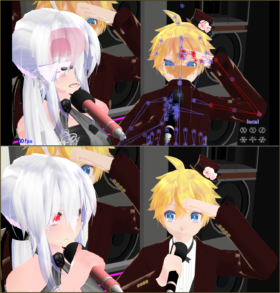
A comparison between an image where items are rendered in the wrong order and a image with the correct order.
Above: What the computer decided to display in the animation window.
Below: What it should look like.
Restarting MMD will fix this issue.

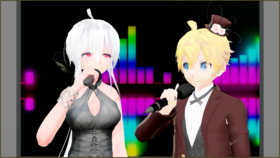
Effects are usually easy for me, but for this video, it seemed I had to fight every step of the way. I had originally planned to use a screen-cast background until I decided that looked too awkward and made a separate video for the background. The video is a combination of VMDSpectrum, WorkingFloor, and partially set-up Raycast. The video’s final dimensions ended up being 480*270 because MMD kept saying it couldn’t read the AVI after a certain point and I figured it was a memory issue. Was it? Who knows, but my hack seemed to work. I used GShader on the main video, as well as ExcellentShader to smooth shadows and DoF to try to make the pixelated-ness of the screen video less noticeable. I had originally planned to add subtitles to the video, with the French lyrics at the top and my own hand-translated English version at the bottom, but I don’t quite have the linguistic capabilities to translate something that complicated at this time.

Watch the video now!

https://www.youtube.com/watch?v=MfNHIhuAQjE Making this has certainly been a learning experience in more ways than I had planned. With each creation, I’m improving. I hope that this experience will help you learn. If you have questions or want advice, leave a comment. I’d be glad to help. Remember to Keep The Faith and credit all of your resources.


– SEE BELOW for MORE MMD TUTORIALS…


— — —


– _ — –


Visit the LearnMMD.com Homepage! Plenty of Mikumikudance instruction and info!

More MMD Tutorials...

Introducing MMD model 1052C China Qipao Miku

Where can I download MMD model 1052C dancers? I want the 1052C China Qipao Miku ...read more

Download Jomomonogm's Snow Miku 2019 for MMD, a most unusual model!

Where can I download Jomomonogm's Snow Miku 2019? What is so unusual about this Snow ...read more

MMD animation made-from-scratch Forgotten Vocaloid Mew Rags on Reggie's MMD Videos

How do I make my own MMD animation from scratch? How do I start my ...read more

Rediscover your old MMD Animations: Love them again!

Rediscover your old MMD Animations: Love them again! https://youtu.be/P4b3todZMUI A labor of love... Remember how it was when ...read more

MMD Boobs too Big yields Too Funny Really Bad Boy video!

Can MMD boobs too big get in the way of a downloaded motion file? What ...read more

Download MMD CyberMiku Black ver1.5 with Glowing Wings and an attitude!

Download MMD CyberMiku Black ver1.5 with Glowing Wings and an attitude to match! A treasure... Yesterday I ...read more

"the making of" my video

Post navigation

Previous Post: Learn to Edit MMD Effects by Editing Raycast Materials
Next Post: The making of: “Bang Bang” Portal video

Related Posts

  • MMD The Zombie Song meme
    I’d never eat your brain – The Zombie Song download links "the making of" my video
  • Making my new “Rin Needs a Hug” Zero-to-450 Challenge Video "the making of" my video
  • Create 450-Frame MMD Animation from scratch!
    Zero-to-450.com: REALLY Learn MikuMikuDance! "the making of" my video
  • Halloween Costume TDA Miku on LearnMMD.com
    Download Halloween Costume TDA Miku edit by dA’s Shiro-NekoVocaloid "the making of" my video
  • New MMD Video Taught Awareness of Camera Angles and Motion Quirks! "the making of" my video
  • The MMD Pity Partry motion is free to download!
    MiyukiOhayashi’s Pity Party motion download includes WAV "the making of" my video

More Related Articles

VDE-4 Champion: Kazumi "the making of" my video
Minimize both windows so you can reach the RECORD in Audacity and then the PLAY in you video player. Make Sound Effects in your MMD video soundtrack. MMD Soundtrack Make Sound Effects on your Desktop using Audacity® "the making of" my video
MMD The Zombie Song meme I’d never eat your brain – The Zombie Song download links "the making of" my video
The MMD Circles Halloween animation is fun to make! Free Download MMD Circles haunts Halloween Visions download links "the making of" my video
dull-VS-alive-animation-environment MMD animation environment… MORE than just a model on a stage! "the making of" my video
The Making of “Hell To Your Doorstep” MMD Animation and Video "the making of" my video

Leave a Reply Cancel reply

Your email address will not be published. Required fields are marked *

Download the latest version of MikuMikuDance!
See the MMD Step-by-Step instructions page!
Learn how to make your own MMD motions!
LearnMMD.com
  • Zooming Out of MMD City Stage.
    Working with Large Stages In MikuMikuDance ARIZONA
  • Physical Operations Tab in MikuMikuDance 7.39 Menu Options MENU Option Descriptions
  • Create 450-Frame MMD Animation from scratch!
    Zero-to-450.com: REALLY Learn MikuMikuDance! "the making of" my video
  • Toon Shader modifies shadows and highlights! GloriaTheAnimator
  • Anticipation is the Second Principle of Animation. Anticipation
  • Make MMD Model Hands from scratch in Blender Blender
  • MMD Cell Phone Screen Video
    MMD Cell Phone Screen Video Creation… just for that vertical screen! Cell-Phone Video
  • Move the house curtains into place using Dummy Bones.
    House Curtains now included in the Auditorium Stage Download New Stage Accessory

Copyright © 2022 Learn MikuMikuDance – MMD Tutorials – Free 3D Animation Software and Instructions..

Powered by PressBook Premium theme

Go to mobile version