
Skip to content
Learn MikuMikuDance – MMD Tutorials – Free 3D Animation Software

Learn MikuMikuDance – MMD Tutorials – Free 3D Animation Software

Download Free Animation Software – Let's Learn How to Do Everything!

  • Step-by-Step MMD instructions
  • DOWNLOADS
  • Troubleshoot, Fix MMD
  • Site Contents
  • Reggie Replies Q&A
  • Homework!
  • What IS MMD?
    • Download MikuMikuDance Newest Latest Version of MMD
  • “HOW TO”
    • Raycast RAY-MMD Effect Tutorials
  • BONUS PAGES
    • Why convert PMD models to PMX?
  • HALL of CHAMPIONS
  • Tutorial Categories
  • About
    • Privacy Policy
  • Toggle search form
  • MMD Theater Seats Don’t Have to Sit on the Floor Animation Shortcuts
  • LearnMMD.com's Video Dojo Expo FIVE
    Beach-side Pool-side “Hot August Nights” – Video Dojo Expo FIVE CONTESTS
  • MME FireLight Effect adds spooky dancing firelight and shadows FireLight effect
  • Why MMD cannot open the models in a saved PMM file Downloading New Models
  • Getting Re-Excited about MikuMikuDance … Happy Birthday Miku! Intro to MikuMikuDance
  • My new MMD Action Video was fun to make! "the making of" my video
  • Editing Effect Textures Creates Brand New Effects! Chestnutscoop
  • With some practice, Rin can dance the sample dance as well as Miku!
    There Can Be Frame Data Ghosts remaining after Deletion Making Smooth Motions

Load Camera Motion Data VMD files using the File Menu in MMD

Posted on June 8, 2012July 24, 2015 By Arizona 8 Comments on Load Camera Motion Data VMD files using the File Menu in MMD

How do I load camera motion data in MMD?  How do I make MMD camera data work? What is MikuMikuDance camera data? What is a camera.vmd?A Feature Article by contributor ARIZONA on LearnMMD.com

Lights! Camera! Action!

How to Load Camera Motion Data

When you started your MMD collection, I hope you noticed that some of your motion data downloads included a .vmd file called “camera” or “camera motion.” This is exactly what it means, all of the pan-shots, zooms, close-up shots and in some cases lighting changes are there. So how do you load it?

First, load all the data that you want to use in your animation (models, dance motion data, accessories, .wav etc.). Then play the animation, this is where you can catch any mistakes and correct them. This is a good habit for the new MMDer. When everything is ready to go, then load your camera motion data (CMD).

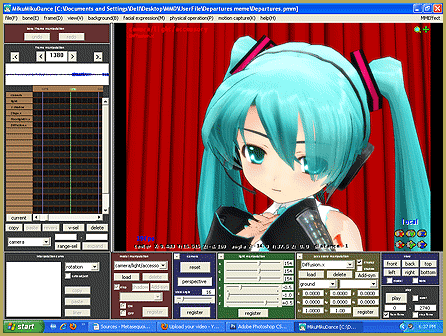
Believe it or not, you load camera motion data in almost the same way you load any other motion data. The only difference is that you Don't use the LOAD button for Camera VMD files. Go to the FILE menu and choose Load Motion Data.DO NOT have a model name selected in the model manipulation panel. The field should read “camera/light/accessory.” If you do happen to load camera data onto a model, nothing bad will happen. It’s just that- nothing will happen. This happens to a lot of newbie MMDers.
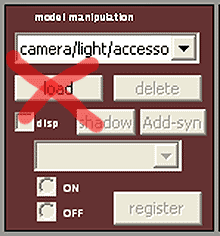
You then go to your main menu; select File. Then select load motion data and make your selection and load the camera motion data. That’s it! When you press play, you’ll see that instead of the stationary camera you are used to seeing. The playback is moving all around.

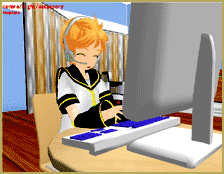
There are two things you need to keep in mind. Once you load your camera data, you cannot use the scroll wheel to zoom in and out. Nor, can you leftThat Len is such a Noob when it comes to MMD!   Picture Credits:   Len by Namamonozukan1.4.   Hospital Room Stage by Harner Productions.   Office Furniture by Yuduki. click your mouse and pan all around the action. During this playback, the camera data overrides your mouse until you stop and/or remove the camera data.
The second thing you need to know is that the motion was created for a specific model, lighting and stage. So if you choose a different stage, then you might see some shots obscured by walls, trees, or any other scenery. You may also see the lighting get darker, lighter or even change color.

This is not to say you cannot adjust the CMD to suit your video. Personally, I would make a copy of the camera data; rename it something like “Galaxias CMD (my edit).vmd.” Then, I would edit, use and abuse that copy for the video. Whenever possible, try to keep an original copy (my favorite oxymoron) in your files.

One of the most powerful features of MikuMikuDance is that you can mix and match. Please don’t think that you have to use the “Caramelldansen” camera data with the “Caramelldansen” model motion data. You could just as easily use the camera data from “Honey, Honey” in a “Levan Polkka” video. Just take care to credit appropriately.

Have fun with this.


– SEE BELOW for MORE MMD TUTORIALS…


— — —


– _ — –


Visit the LearnMMD.com Homepage! Plenty of Mikumikudance instruction and info!

More MMD Tutorials...

Loading Background AVI Files into MMD (2021 Edition)

How do I load background AVI files into MMD?  What does it mean when MMD ...read more

Running MikuMikuDance in Linux using Wine and DXVK

How do I run MMD on Linux? Does MikuMikuDance run on Linux? How do I ...read more

How to subtitle MMD videos

How do I subtitle MMD videos? How do I make subtitles for my MMD videos? ...read more

Using the right codec when Rendering to AVI in MMD

What codecs do I use for rendering a video in MMD? What codec gives me ...read more

YouTube serves video playback quality to best suit your viewing-screen

What happens to your video after you've uploaded one to YouTube? YouTube serves video playback quality ...read more

Learn MMD Basics before jumping into a big project!

Learn MMD Basics before jumping into a big project! A reader wrote a comment... I tried to make ...read more

ARIZONA, Nuts & Bolts, VMD files Tags:beginner, camera motion, learnmmd, mikumikudance, VMD file

Post navigation

Previous Post: Use Accessory Manipulation fields to position/adjust Accessories
Next Post: Keyboard Shortcuts Aplenty in MikuMikuDance 7.39 by ClintImTired

Related Posts

  • Announcing The 2013 Momi Cup Celebration. ARIZONA
  • Use MMD Memes to get Motion and WAV Files for MikuMikuDance! Downloading New Models
  • Learnmmd.com hosts MMD Panel at San Japan 8 bit. ARIZONA
  • Motion is LOCAL, per the Model's orientation, or GOBAL, per the Program's Grid. (Meiko Sakine from MMD 7.39)
    Local and Global Mode Bone Movement MMD: Miku’s Mode Swings ARIZONA
  • Magician Miku pulls a magic trick and reverses her motion data!
    How to Reverse Motion Data in MikuMikuDance ARIZONA
  • The MMD 7.39 BONE MENU Options MENU Option Descriptions

More Related Articles

The MMD 7.39 BONE MENU Options MENU Option Descriptions
The FILE Menu Options MENU Option Descriptions
Making Smooth Motions with MMD Making Smooth Motions
Announcing The 2013 Momi Cup Celebration. ARIZONA
How to Switch Models and Stages in MikuMikuDance Accessory Manipulation/Adjust
Dummy Bones allow you to customize your accessory manipulations! Using The Dummy Bone for MikuMikuDance Accessory Manipulation/Adjust

Comments (8) on “Load Camera Motion Data VMD files using the File Menu in MMD”

  1. Yang says:
    August 26, 2018 at 5:34 am

    MMD Ver.9.31 English x64
    That’s the progress that I found something wrong:
    I created a camera motion, and saved it to both pmm and vmd file.
    But later when I loaded it, the camera motion in pmm works fine,
    however the motion in vmd works the wrong way…
    I also downloaded another camera motion from Internet.
    Yes, it did’t work…
    I’m not sure what’s wrong..
    Maybe there is a bug in loading camera motion..?
    (I don’t speak English…)

    Reply
    1. KillerBeer says:
      August 26, 2018 at 11:24 pm

      To save a motion as a .vmd file, you have to select in FMP every *registered* point you want to be saved (all those diamond markers should be highlighted red). Easier to do it by typing start and end frame numbers and hitting “range-sel”.

      https://learnmmd.com/wp-content/uploads/2016/02/FMP_frame_1300.png

      Reply
  2. Nicole says:
    February 4, 2017 at 10:39 pm

    hello. im having a small problem, i have a motion that i can apply to a stage. when i do that, mmd crashes every time! i have to apply the motion to the stage in order or the models to be in the correct place. can someone help?

    Reply
    1. KillerBeer says:
      February 5, 2017 at 12:01 am

      What do you mean by “apply a motion to a stage”? A motion has to be applied to a particular model when it is selected in Model Manipulation Panel. In multi-model projects, every model has its own motion. The only exception is camera motions files, when they are provided separately.

      Reply
  3. Jaslyn says:
    August 19, 2016 at 12:15 pm

    OMG IT WORKED

    Reply
  4. Visto says:
    September 17, 2015 at 6:38 am

    I ahve downloaded many vmd and i dont know what to do at this point it moves over to a zip file than I cannot add my stages , dances only my characters.

    Reply
    1. Reggie_Dentmore says:
      September 17, 2015 at 5:58 pm

      Visto… I sent you an email… let’s figure it out.

      Reply
  5. Mayi says:
    June 20, 2015 at 2:18 am

    Yes the camera is messing up when I’m trying to do”No Cares,Meme the camera keeps on messing up and the background and stages gets too big is there a way to get them smaller and large plus not hiding the models?

    Reply

Leave a Reply Cancel reply

Your email address will not be published. Required fields are marked *

Download the latest version of MikuMikuDance!
See the MMD Step-by-Step instructions page!
Learn how to make your own MMD motions!
LearnMMD.com
  • Keep The Faith MMD
    MMD Models Rant Keep the Faith-MMD Credits/Sharing
  • MMD Banjo_RD by Reggie Dentmore for MikuMikuDance 7.39
    LearnMMD’s Dueling Banjos Banjo is avilable for Download! Google SketchUp and MMD
  • Make Your YouTube Channel Popular with Engrossing Introductions MMD Basics
  • LearnMMD.com _ MikuMikuDance MMD Tutorials
    DO NOT reduce AVI file sizes that go up to YouTube HD Videos in MMD
  • You might name this model's folde "Short_Kimono_Teto_by_Nanami".
    Organize Your MMD Model Collection, Track Your Sources ARIZONA
  • Learn to Edit MMD Effects by Editing Raycast Materials Bandages
  • You Are My Senpai MMD Meme Project Download MMD Memes
  • MMD smoke clouds are easy to make with Beamman's Breath effect.
    MMD Smoke Clouds and a Smoke Filled Room… Beamman's Breath Effect

Copyright © 2022 Learn MikuMikuDance – MMD Tutorials – Free 3D Animation Software and Instructions..

Powered by PressBook Premium theme

Go to mobile version