Skip to content
Learn MikuMikuDance – MMD Tutorials – Free 3D Animation Software

Learn MikuMikuDance – MMD Tutorials – Free 3D Animation Software

Download Free Animation Software – Let's Learn How to Do Everything!

  • Step-by-Step MMD instructions
  • DOWNLOADS
  • Troubleshoot, Fix MMD
  • Site Contents
  • Reggie Replies Q&A
  • Homework!
  • What IS MMD?
    • Download MikuMikuDance Newest Latest Version of MMD
  • “HOW TO”
    • Raycast RAY-MMD Effect Tutorials
  • BONUS PAGES
    • Why convert PMD models to PMX?
  • HALL of CHAMPIONS
  • Tutorial Categories
  • About
    • Privacy Policy
  • Toggle search form
  • VDE-3 Champion: Katherine Duncan Video Dojo Champions
  • LearnMMD.com _ MikuMikuDance MMD Tutorials
    A Discussion on the subject of Bone Deformation Hierarchy Bandages
  • YouTube Audio Library supplies Free music Copyrighted Music
  • VDE-FIVE Honorable Mention: Jonah Snyder Video Dojo Champions
  • My new “Ring Around the Moon” MMD video is on YouTube "the making of" my video
  • About changing models skirts using PMD Editor PMXE KillerBeer
  • Happy Birthday Miku (16 Again) … Miku’s Birthday Intro to MikuMikuDance
  • MMD NyaReimu dances to Miku’s “The World is Mine” "the making of" my video

Different Eye Textures in one model using PMXE

Posted on July 10, 2020April 7, 2021 By JuneTarzan No Comments on Different Eye Textures in one model using PMXE

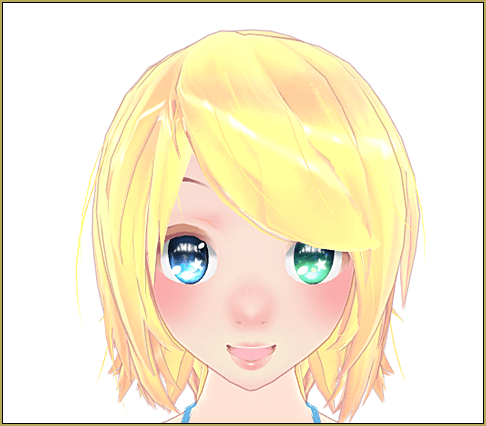
How do I make an MMD model that has two eye colors? Can I make a model that has two eye textures? Can I modify my model to have two different eye colors?

Want to have different eye textures in one model?

It’s very easy to make a model that has two eye textures. You just need the following elements…

  • PMX Editor (get it from LearnMMD.com Download page)
  • MMD base (You can use any base you want, just be sure to read the readme file)
  • Eye textures (If the eye texture that is already on the base looks perfect for your model, then you just need one more eye texture.)

Open PMXEditor and get started

Now, open PMXE, and load your base up. At the top, click “M”… You will see a new window that says Refine/Masking.
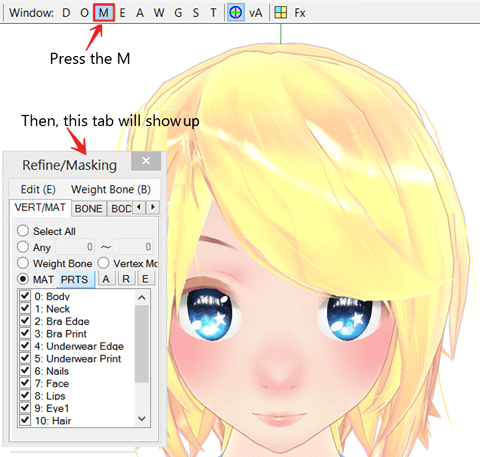
My original model has both eyes the same... but I want different eye textures in one model.

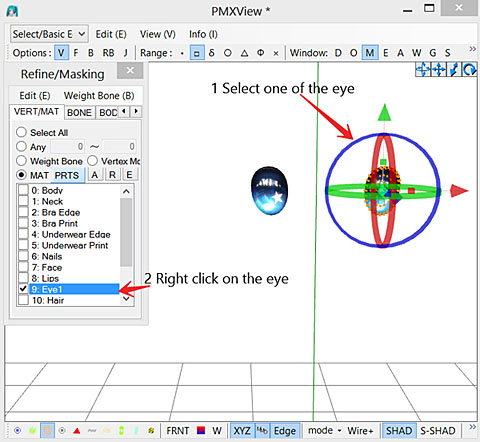
As you can see, all the materials in the tab are checked. Click on a box and that item will turn invisible, click on it again and it will be visible. Try to click all of them until you know which one is the eye. Now, with the eye un-checked, hide the other parts by clicking the “R” which makes every part invisible, except for the eye. Now, select one of the eyes. Right-click in that drop-down, click “split” and click Yes.
And for the last step, just change the eye texture. Simply go to the material tab. Select your eye. Type in your new eye texture’s name and its file type in the box that says “Tex:” If your eye texture is in a folder, type in the folder name, follow with “\” or “/” without the quotation mark. Then your eye texture name, then your eye texture’s file type (e.g. if your eye texture is in a folder named tex, the eye texture is named 1, and its file type is .png, write: tex/1.png)
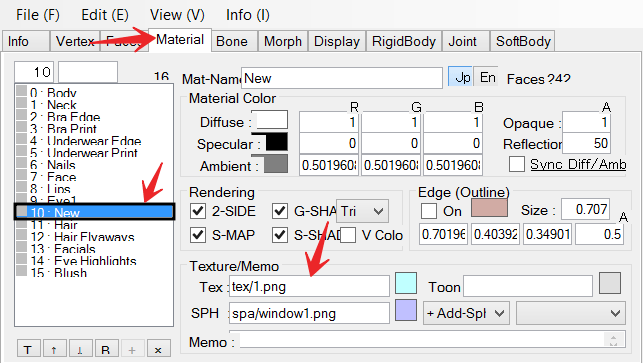
Add your new eye texture in PMXE.

and… Boom! two eye textures!

Now, just add hair, clothes, and accessory to the model, and you’re all done!

Have fun with PMXE and MikuMikuDance!

Base and eyes are by TDA, HiLoMMD, Stylc, YamiSweet, 2234083174


– SEE BELOW for MORE MMD TUTORIALS…


— — —


– _ — –


Visit the LearnMMD.com Homepage! Plenty of Mikumikudance instruction and info!

More MMD Tutorials...

Enjoy the "camera Angles WEIRD in Anime" meme...

Enjoy the "camera Angles WEIRD in Anime" meme... This image is from The Slayers - NEXT, ...read more

Reader asks how to create MMD artwork... stuff like posing, camerawork?

A reader asks... Is there a tutorial on how to create MMD artwork, like those you ...read more

Learn MikuMikuDance in Small Steps! New LearnMMD Video Series

Learn MikuMikuDance in Small Steps. Where can I find easy-to-follow MMD instructions on YouTube? How ...read more

Apply Multiple Effects on an Entire MMD Model Using M4Layer Effect

How can I apply multiple effects to an MMD model? Can I use more than ...read more

MMD Plugin Manager... I Found a Treasure!

What sorts of MMD Plugins are there? MMD Plugin Manager? MMD Plugins. Plugin MMD. More ...read more

2025: Hatsune Miku is 18... but she is designed to be always 16 Years old, by design and in reality!

Finally, in 2023, Hatsune Miku is 16 years old! but in August of 2025, she ...read more

JuneTarzan, MMD Tutorials, PMDE Eye Textures

Post navigation

Previous Post: MME: Less is More… Select only those that you need.
Next Post: Good MMD videos require Inspiration, Vision, Planning: The Lament of Okada’s Ghost

Related Posts

  • RAY-MMD: Spruce up your videos with Dynamic Lighting MMD Tutorials
  • Kasane Teto with Beamman's Simple Magic Explosion2 positioned behind her
    Beamman’s SimpleMagic creates Explosions, Fire-Balls and Swirling Flames! Beamman's SimpleMagic
  • Use YouTube Video Analytics to Attract and maintain viewers!
    Use YouTube Video Analytics Attract Maintain Viewers "the making of" my video
  • Position Model Parts in PMDE using a placeholder .x Model image Making Models
  • Using Texture Transparency hides MMD model problem areas MMD Tutorials
  • Miku Short Film Featured
    Anime Shorts – Five minutes worth of animation, maybe three! Animation Shortcuts

More Related Articles

Good MMD videos require Inspiration, Vision, Planning: The Lament of Okada’s Ghost MMD Basics
Visit Krystal-Sakura on Deviant Art to get "Sparkly Eyes" for MMD 7.39 Change a Model’s Eyes Using MMD Eye Packs in MikuMikuDance NOKO2
The MME Oppai Effect adjusts the breast size of your MME models! MME Oppai Effect enhances MMD Model’s figure… one for the boys! MMD Tutorials
Half-Lambert Shader. How to Use the Half-Lambert Shader in MMD Half-Lambert Shader
LearnMMD.com _ MikuMikuDance MMD Tutorials A Discussion on the subject of Bone Deformation Hierarchy Bandages
The Cheaplens Effect is easy to use and very powerful! MME CheapLens Effect controls the “Look” of your MMD video CheapLens Effect

Leave a Reply Cancel reply

Your email address will not be published. Required fields are marked *

Download the latest version of MikuMikuDance!
See the MMD Step-by-Step instructions page!
Learn how to make your own MMD motions!
LearnMMD.com
  • Use Proper MMD Etiquette When Using New Models and Accessories Downloading New Models
  • Rigging Models with Appends using PMXEditor Bandages
  • This picture was taken as a "Render to Picture File" command from the FILE Menu.
    MMD Screen Capture Tool makes taking pictures a Snap! Making Videos - Rendering to AVI
  • Speech Synthesizer gives MMD Models a voice! Making Soundtracks
  • Audacity® 2.0 Audio Editor easily converts mp3 to WAV files for MMD Music and WAV Files
  • Use PMDE to make a Model for MMD almost from Scratch MMD Tutorials
  • Editing Effect Textures Creates Brand New Effects! Chestnutscoop
  • Making MikuMikuDance Pictures Render to Picture File Tutorial Camera Motion

Copyright © 2022 Learn MikuMikuDance – MMD Tutorials – Free 3D Animation Software and Instructions..

Powered by PressBook Premium theme

Go to mobile version