Skip to content
Learn MikuMikuDance – MMD Tutorials – Free 3D Animation Software

Learn MikuMikuDance – MMD Tutorials – Free 3D Animation Software

Download Free Animation Software – Let's Learn How to Do Everything!

  • Step-by-Step MMD instructions
  • DOWNLOADS
  • Troubleshoot, Fix MMD
  • Site Contents
  • Reggie Replies Q&A
  • Homework!
  • What IS MMD?
    • Download MikuMikuDance Newest Latest Version of MMD
  • “HOW TO”
    • Raycast RAY-MMD Effect Tutorials
  • BONUS PAGES
    • Why convert PMD models to PMX?
  • HALL of CHAMPIONS
  • Tutorial Categories
  • About
    • Privacy Policy
  • Toggle search form
  • New “LearnMMD Wars” Video Posted to YouTube! Google SketchUp and MMD
  • "Say cheese!" Setting up the camera moves in MMD 7.39 takes some thought. Credits: MMD Little Town by Harner Productions, Chibi Miku Yamato Style 1.35 by Koshitsuki, Chibi NC DT SeeU by HousekineMinto, Video Camera by Dark Konata
    Camera Motion Instructions 1 – MMD Basics ARIZONA
  • Make Chibi Models for MikuMikuDance! Adjust PMD Model Size
  • Use Center Position Bias to duplicate a motion Functions-Copy-Paste-Expand
  • Making stages/accessories for MMD using Sketchup Google SketchUp and MMD
  • The Fourth Momi Cup is Set to Begin! ARIZONA
  • Video Dojo Expo 2 Champion: Turquoise Narcotic Video Dojo Champions
  • Ghost Effect for MME
    How to Use the Ghost Effect for MME! ARIZONA
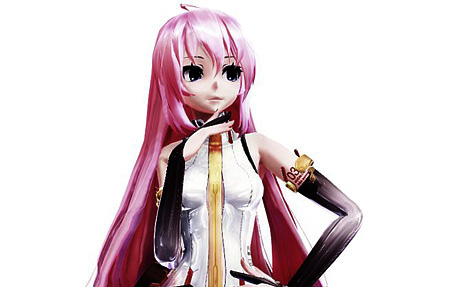
Luka Loves the Rainbow Ring

Use MME Rainbow Ring Effect in MikuMikuDance

Posted on April 18, 2013July 30, 2015 By Arizona 2 Comments on Use MME Rainbow Ring Effect in MikuMikuDance

How to use the Rainbow Ring Effect in MMD? Where do you get the Rainbow Ring Effect? A Feature Article by contributor ARIZONA on LearnMMD.comLearnMMD MME Tutorials. How do you get the Rainbow Ring to follow the model? Is there a tutorial for the Rainbow Ring Effect?

Using the Rainbow Ring Effect in MMD.

I hope you have enjoyed watching the Momi Cup as much as I have. I  noticed that one of the top 5 finalists had used the Rainbow Ring effect in a very different way. Aelita1234’s entry SuperStar used the Rainbow Ring as effect lighting by enlarging it to at least 10-15 times its usual size. You can see Aelita’s entry here: http://www.youtube.com/watch?v=oe447Jmdveo Her wonderful video is the inspiration for this article.
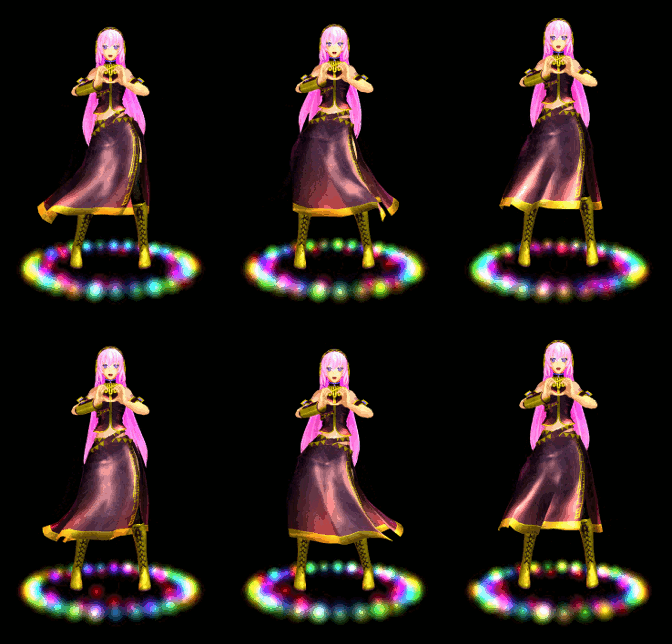
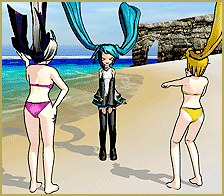
Luka Loves the Rainbow RingYou can download the Rainbow Ring effect (along with some others) at Roriicon’s YouTube Channel at: http://www.youtube.com/watch?v=XIO06nbdblI . Don’t forget to mind your manners and say “Thank you”.

I’m sure you have MME properly installed. If not, you should check out (Noko2’s  article about downloading and installing MME for MikuMikuDance)  Then place this into your Effects folder. If you don’t have an Effects folder then make one and place all of your effects there.

Load your model, motion, and .wav files. Make sure your Model Manipulation Panel (MMP) reads camera/light/accessory. Then click the load button in the Accessory Manipulation Panel (AMP). Now go to your Effects folder and select the Rainbow Ring Effect. So now, you look at your screen-and nothing’s happening. You need to go to your Main Menu bar and click the background tab and select black background and now you’ll see it.

Somewhere Over the Rainbow.

At this point, you can now change the size and diameter of the ring in the Si field of the AMP. You can also attach the Rainbow Ring to your model’s center bone and have the ring follow underneath their feet. Let’s do that! In the AMP there is a field that has ground written click the down arrow and select your model’s name.

Next to that, is another field; here you choose where on the model you want the rainbow ring attached. Select the center bone. (Note: if you’re using a model with Japanese names then you might have to do some trial and error. More often than not, the center bone is the first or second in the list). Now you will have to put in negative values in the Y field of the AMP to lower the Rainbow Ring around your model’s feet. Don’t forget to register this in the AMP.

I was so inspired by Aelita1234’s video that I made my own Rainbow Ring video for our YouTube channel:http://www.youtube.com/watch?v=uPIck0JH2VQ It is in no way, shape, or form as superb as Aelita1234’s; it was still fun to play with though.

Have fun with this.

Sources:
Luka_default by Montecore.
Motion Data: Libera Me.
Effects: Adult Shader and SSAO Lite


– SEE BELOW for MORE MMD TUTORIALS…


— — —


– _ — –


Visit the LearnMMD.com Homepage! Plenty of Mikumikudance instruction and info!

More MMD Tutorials...

966_ Otogibanashi Toon "Fairy Tale" shader effect recolors your models

What is the 966_ Otogibanashi Toon shader? How can I recolor my models without using ...read more

ALMorphMaker Adds AutoLuminous Morphs to your Model!

What is the ALMorphMaker plugin? How can I put AutoLuminous morphs on a model? How can ...read more

DropShadow_dual Creates Two DropShadow Effects at Once!

Why can I only load one DropShadow effect at the same time? How does the ...read more

Editing Effect Textures Creates Brand New Effects!

Can editing effect textures change the look of my MME effects? What is an effect ...read more

Good MMD videos require Inspiration, Vision, Planning: The Lament of Okada's Ghost

The Lament of Okada's Ghost... The secret to making good MMD videos All MMD videos have three ...read more

MME: Less is More... Select only those that you need.

Carefully select only the MMEs that you need for your scene. Control the look of ...read more

ARIZONA, MME Effects Tutorials, Rainbow Ring, Using MME Effects

Post navigation

Previous Post: Convert .PMD Stages to .X Format using PMDE for MMD
Next Post: My First MMD Video – After Struggling with Blender, MMD was Easy

Related Posts

  • Download MME v037 in English 32-Bit or 64-Bit from LearnMMD.com Download MME MikuMikuEffects
  • MMD PostAnalogTV effect gives easy scene transitions and more! MME Effects Tutorials
  • Using Beamman Particle-styled MME effects Beamman's AuraParticle
  • "Say cheese!" Setting up the camera moves in MMD 7.39 takes some thought. Credits: MMD Little Town by Harner Productions, Chibi Miku Yamato Style 1.35 by Koshitsuki, Chibi NC DT SeeU by HousekineMinto, Video Camera by Dark Konata
    Camera Motion Instructions 1 – MMD Basics ARIZONA
  • pmothair Effect Makes Hair Actually Look like hair MMD Tutorials
  • Download MME v037 in English install MikuMikuEffects special effects Download MME MikuMikuEffects

More Related Articles

You cannot use Box-Sel to select a portion of a model. You must selectthe entire MMD model. BOX-sel lets you select an entire model in MikuMikuDance ARIZONA
Fireworks Kai effect Using the Fireworks Kai effect for MikuMikuDance. ARIZONA
MME: Less is More… Select only those that you need. Cook Torrence effect
How to Add Multiple Effects on a Model. Adult Shader effect
Download and Install MikuMikuEffect (MME) To Use Special Effects Nameplate effect
NCHLShader2 adds realistic depth to MMD models Advanced Shader Technique

Comments (2) on “Use MME Rainbow Ring Effect in MikuMikuDance”

  1. Shizune says:
    July 31, 2021 at 7:39 pm

    how do I rotate it to be horizontal, or space out the sparkles? to look something like in this video https://www.youtube.com/watch?v=-LCz6lUi63k&t=6s

    Reply
    1. Reggie_Dentmore says:
      July 31, 2021 at 8:24 pm

      Hmmm… I don’t know… haven’t played with it to learn how to work it.

      Reply

Leave a Reply Cancel reply

Your email address will not be published. Required fields are marked *

Download the latest version of MikuMikuDance!
See the MMD Step-by-Step instructions page!
Learn how to make your own MMD motions!
LearnMMD.com
  • Make Smooth Motions using Multiple Keyframes Animation Shortcuts
  • The Cheaplens Effect is easy to use and very powerful!
    MME CheapLens Effect controls the “Look” of your MMD video CheapLens Effect
  • Recent MikuMikuDance Updates may become collectible, who knows?! Download MikuMikuDance
  • pmothair Effect Makes Hair Actually Look like hair MMD Tutorials
  • Make successful MMD YouTube videos MMD Basics
  • Skirt in the process of being rigged in PMX Editor
    PMXE Skirt Plugin Presets and Other Tips for Awesome Skirts Mae Blythe
  • MME Balloon Effect (And what I found out) Balloon Effect
  • Yellow PV LAT Miku downloaded from a MMD Newcomers find on YouTube.
    Source for New MMD Models: MMD Newcomers on YouTube Downloading New Models

Copyright © 2022 Learn MikuMikuDance – MMD Tutorials – Free 3D Animation Software and Instructions..

Powered by PressBook Premium theme

Go to mobile version