


How do you create realistic motion data in MMD? How do get models to move better  in MikuMikuDance? How do you use the background AVI to make motion data?
Use The Background AVI to Make Realistic Animations in MMD.

“How do you make realistic motion data in MMD?” is one of the most asked questions we get here at LearnMMD. The obvious answer is to practice, practice, practice. One way to do this is to use the background AVI (Audio Visual Interleave) feature in MikuMikuDance.
I had written an article about using pictures and the background AVI as a backdrop (https://learnmmd.com/http:/learnmmd.com/add-background-pictures-and-video-to-mmd/) and in the post note I made a glancing reference to using this technique. If you haven’t ever loaded a background AVI, then read that article first.
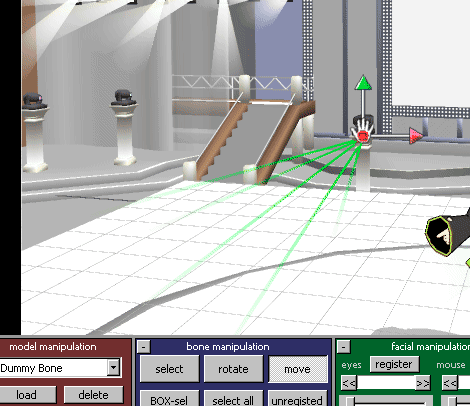
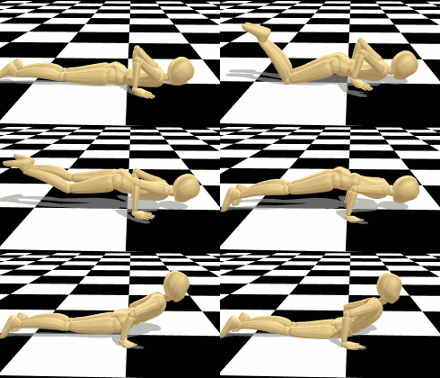 Load your background AVI, and then load your model and .wav file. As a suggestion, go to your main menu’s File tab and check “play WAV with frame.” This lets you hear where the music is playing at that particular frame. Use your keyboard’s left and right arrow keys to find the places where you want to position your model to duplicate the background AVI. The advantages of this technique are that you have a rough idea about what you want to create. The other, and most important, is that you have your timing down.
Working in the Background.
Your background AVI can be something you might have recorded. You can also take 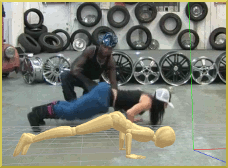 your video camera and have your few remaining friends (MMD is very addictive. It’s really easy to lose track of family, friends, jobs, etc.) act out what you want to animate. In theater, this is called blocking the scene. If you or one of your friends is a dancer, then record original choreography and use that. A camera that is fixed in one spot makes this easier.
If you get permission and credit appropriately you could also use a YouTube video as your background AVI. Most people would be flattered to have inspired someone else’s creativity. As a bonus, you can use your animation and leave a video response to their original upload. Don’t forget, MMD is only able to recognize just one type of AVI file (AVI1.0). You might need a video conversion program (I use Freemake).
I want to give you a word of warning: as tempting as it may be, don’t try to recreate the background motion EXACTLY. If you try to this frame by frame it becomes a migraine and a half. This also annuls the most powerful feature of MMD- the physics engine. For all intents and purposes, you might as well be doing hand-drawn flip page animation. Again, save your time, tears as well as your sanity, and just skip to certain key points in the background AVI and let MikuMikuDance do the rest.
Have fun with this.
Credits:
Model: Wooden Doll (Omomasu).
Motion Data inspired by Dancing’s Worm choreography: www.youtube.com/watch?v=u01REwpdJ7Q from Dancing’s YouTube channel “How to Do the Worm.”
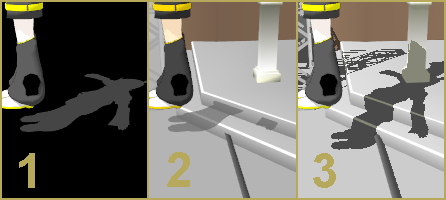
Stage: Black and White Checkered Floor by SelfishNeko.
As I was writing this article a recently came across an MMDer who used this technique quite effectively. Instead of doing a video for our YouTube channel www.youtube.com/user/LearnMMD .  I decided to provide a link to their upload. Anakuya1 was inspired by a YouTube video uploaded by Bestreet Hip-Hop and created this: https://www.youtube.com/watch?v=HuKeGFHGEfo . I think it is a very good first effort. I’m looking forward to seeing more of Anakuya1’s videos!
Post Note:
The inspiration for this article was an entry in the MMD Cup 9. I couldn’t find it until now. Here’s the link: www.youtube.com/watch?v=hpuVlpTi6kg . It is a take-off of the “Cooking with Haku” theme that was started a couple years ago. I thought it was great aid to the budding MMDer. I saw this and thought “That’s an article!”
Inspiration is wherever you find it.
– SEE BELOW for MORE MMD TUTORIALS…
— — —
– _ — –



I need to know how these guys keep predicting my situation. I am literally addicted to MMD. how is that even possible???
OK…
— Reggie
Hey reggie! I know I shouldnt send this in a comment but can you contact me by e-mail. I tried e-mailing you a while back but never got a reply.
When I load the VMD, nothing changes on the model except the facial expression. No animation is loaded.
The only thing that changes is the facial expression.
What’s wrong?
Is it a motion you’ve downloaded somewhere, or made it yourself? Did you try to apply it to different models?
I’m still having issues on how i get the video to appear. i want to use a reference, and i uploaded it to mmd. i downloaded players. i still don’t know what i’m doing. -n-
Unfortunately, I don’t know what you’re doing either. Are you sure it’s not something simpler you want to start with?
Cool I am one happy camper camper! this is going to make My day. Meme are fun But I want to make my own animation.Why? Why not? this is fun.
I always try my best to help.
As a side note, the inspiration for that article was an entry in the MMD Cup IX. The video showed that technique and I thought “OMG! I’ve got to tell evetone about this!” I’ve been trying to find that video again. I want to provide a link to it. I’m thinking it might have been removed.
I’m so glad you’re having fun with this.
I can’t seem to load AVIs from my camera. I downloaded Windows 7 Codec Pack and Ffdshow But have no idea how to use them.
Hey xxbodger!
It sounds like you might need to convert your raw file into an avi1 file. I use Freemake video conversion software ver. 2.3.4.1 for my conversions (from CNET). It is an older version but there are all kinds of them out there, so explore your possibilities.
how do we get the video from youtube to the software?
i try making it into mp4 and i convert it into avi file wheni try loading the video it just says cant open avi flie
There are actually two types of AVI files – “Type 1” and “Type 2”. Unfortunately, MMD only recognizes Type 1, so if your file is of a wrong type, you’ll have to recode it. I remember using FormatFactory for that purpose once (though that was long ago, and I’m not sure of all details). Some other similar software might be useful as well.
Great article I like the idea of using a back ground AVI for reference for making my own animations.