
How do you create a White Silhouette on a black background in MikuMikuDance? How doyou use the Silhouette Effect in MME? LearnMMD MME Tutorials. Where do you download the Silhouette Effect for  MikuMikuEffects? Is there a tutorial for the Silhouette Effect for MME?
Making White Silhouettes in MikuMikuEffects.
Not too long ago, I had written an article about using the Spotlight Effect to create a black silhouette against a white background. I figured that the question would pop up: “How do you do a white silhouette against a black background?” Foreseeing this, I alluded to this Silhouette effect as the subject of another article. Sure enough, that exact question came up! Well, here’s how.
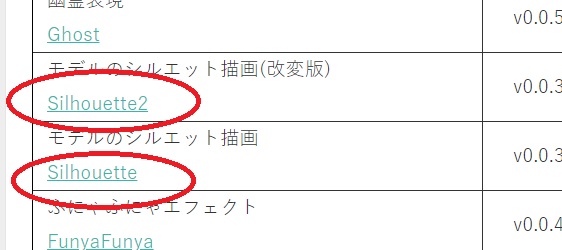
You may download the Silhouette Effect at: http://harigane.at.webry.info/201010/article_1.html . There are two versions available.
If you want to use effects in MikuMikuDance you must have MMEffects properly installed. One of my highly talented colleagues, Noko2, has an article about downloading and installing MME: https://learnmmd.com/http:/learnmmd.com/download-mme-install-mikimikueffects-add-effects-mmd-7-39/
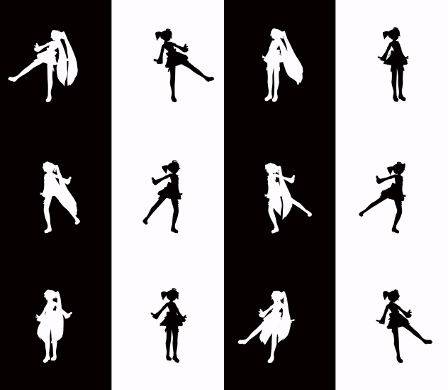 Once you have downloaded the Silhouette Effect and placed it into your Effects folder, go ahead and load up your model, motion, and wav files. Now click on the MMEffect button at the top right of your screen. Another window will open up with a listing of all the models and accessories you had previously loaded. Click on the name of the model you want to have silhouetted in white. Find the Silhouette Effect folder and select Silhouette_Obj. Your model is now white.
The Positive and Negative sides of Silhouettes.
These silhouette types of videos are popular because of the many Bad Apple videos that have been uploaded. Everyone seems to think that you could/should do this shadow play with Bad Apple. However, you can take just about any motion data reverse it (or not) and it will be just as effective. Another thing to remember is that your background needs to compliment whatever silhouette color you use.
One of the biggest drawbacks of these silhouette movies is that you completely eliminate the effectiveness of any facial expressions. So, if you use any accompanying camera motion data that may feature a close up of the model winking or smiling, then you will just get a close up of a black or white silhouetted head. So look at the original data with that in mind.
I have uploaded a short and sweet video experiment of 3 Haku Yowane models performing Galaxias using three different effects: this Silhouette Effect; the Monochrome Effect and the Spotlight Effect. You can find it at our YouTube Channel here: http://www.youtube.com/watch?v=_k42rp2x_eA&feature=youtu.be
Have fun with this.
Sources:
Gothic Teto and Miku by Nigamon.
Heart Catch Motion Data by Unknown.
Black and White background by Arizona.
– SEE BELOW for MORE MMD TUTORIALS…
— — —
– _ — –





the links to download don’t work anymore
I just tried it… and it DOES work… just a bit tricky! The link for the zip is a scroll-down-a-bit to find. When I CLICKED it, nothing happened. So I right-clicked the link and chose COPY Link Address… and I pasted that address into a new tab… and the zip DID download, just fine.
NOOOOOOOOOOO IT TURNED BLUE PLS HELP
Open the Silhouette2.fx in Notepad, and edit the line “#define UseTex 1” to “0”.
How do i make it a black Silhouettes?
1) Use the Silhouette2 version of the effect.
2) Edit Silhouette2.fx file in Notepad to set the UseTex parameter to 0.
3) Apply Silhouette2.fx to the model using MME panel.
4) Load SilhouetteControl.pmd into model list.
5) Use SilhouetteControl.pmd’s “facial” morphs to set model’s color and other parameters.
using the black silhouette, when I press camera/light/accessory my model disappears :(
Can I have the black and white background.
Make a black and white picture in Paint (or whatever you use). It doesn’t have to be as big as your screen, just must have the same proportions. Then set it as background.
XD My silhouette comes up turquoise with hachune miku!
I have a fix for this!
Under “model manipulation”, click “load”, then find your silhouette effect folder. Click on the one that says “SilhouetteControl.pmd”. After it’s loaded, go to the “facial manipulation” tab, and under “mouth” there should be a setting that says “expansion”. Drag the slider all the way, and that’ll get rid of miku (sort of).
I don’t know about the turquoise-ness though. I have the same problem :)
Hope this helped!
Oh, oops. The comment above referred to the Spotlight effect.
Ah, can you use it for x files? When I used it on a apple accessory, it twisted into a strange shape.
Here is a picture of it:
http://i61.tinypic.com/2ptrouf.jpg
hey, is there any way to bind a silhouette colour to a background area? like if they start crossing the black/white line in the background, i want my white one to go black and vice versa. is that possible?
Thank you for your question!
Unfortunately, I know of no way to do the effect you’re describing with just the silhouette effect. You are locked in to the color you started your model in.
There are some video editing programs that might allow you to what you want. There might be an MMEffect that I might be unaware of as well.
You could try to mask the difference with a well placed barrier and using two different models switched out. This would require some creative camera angles.
I wish I could be more helpful.
-Arizona
Ugh… I can’t figure out how to make the silhouette black…
yaaay! thanks! *salutes* I’ll do my best!
if it helps, here;s the link to an image of zee dilemma…
http://roseverdict.deviantart.com/art/Something-Is-Very-Wrong-Here-495829593?ga_submit_new=10%253A1416620281&ga_type=edit&ga_changes=1&ga_recent=1
uhm…i have the silhouette thing, and i can make the models white with one of the things, but when i try Silhouette2 i come out with…a silhouette that looks like a window to the ievan polkka video. -.- can somebody tell me how to make a black silhouette without messing with the lights?
We sent you an email to help you with it … Check your email for a note from Arizona … “Black Silhouette”
Simple and awesome tutorial! Nice work.