Skip to content
Learn MikuMikuDance – MMD Tutorials – Free 3D Animation Software

Learn MikuMikuDance – MMD Tutorials – Free 3D Animation Software

Download Free Animation Software – Let's Learn How to Do Everything!

  • Step-by-Step MMD instructions
  • DOWNLOADS
  • Troubleshoot, Fix MMD
  • Site Contents
  • Reggie Replies Q&A
  • Homework!
  • What IS MMD?
    • Download MikuMikuDance Newest Latest Version of MMD
  • “HOW TO”
    • Raycast RAY-MMD Effect Tutorials
  • BONUS PAGES
    • Why convert PMD models to PMX?
  • HALL of CHAMPIONS
  • Tutorial Categories
  • About
    • Privacy Policy
  • Toggle search form
  • LearnMMD.com: The Instruction Sheet you've been searching for!
    Use Google SketchUp to make DirectX Accessories in MMD Dummy Bones
  • Yukari's Gap Portal Style.
    The In’s and Out’s of Yukari’s Gap for MikuMikuDance. ARIZONA
  • Add interest to you choreography by moving/rotating models with Mother Bones.
    Add Interest: Place Multiple Models Onstage Using Mother Bones ARIZONA
  • Different Eye Textures in one model using PMXE JuneTarzan
  • The Power of Beamman’s Post Movie Effect Beamman's Post Movie effect
  • Let your MMD model breathe and move while standing still! Creating Motions
  • Announcing The 2013 Momi Cup Celebration. ARIZONA
  • Learn to resize PMD models
    How to resize PMD models (and what to do when they don’t) KillerBeer
Create and save a sexy, natural pose for your MikuMikuDance 7.39 models.

Create, Save a Natural, Sexy Pose you can load in MikuMikuDance

Posted on October 19, 2011August 1, 2015 By Reggie_Dentmore No Comments on Create, Save a Natural, Sexy Pose you can load in MikuMikuDance

How can I save a pose position? My characters are so stiff. Where can I get a sexy pose for my Miku Miku Dance models? MikuMikuDance Tutorial. I want to load a pose file.A Feature Article by Reggie Dentmore on LearnMMD.com

Create and Save a Natural, Sexy Pose that you can load in MikuMikuDance

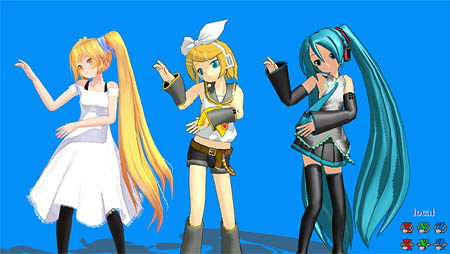
When you first load a model in MikuMikuDance, it arrives posed in a rather stiff position. It always takes a few moments to maneuver the character into a more natural, appealing pose.  So … I created a nice stance that I could save to use as a starting place … a “quick start” … for a dance project.
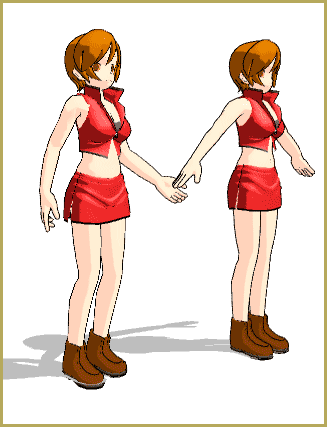
Create and save a sexy, natural pose for your MikuMikuDance models.

I adjusted almost every major bone to achieve that position. I used my saved Hand Pose files to quickly position the hands in a natural way. I then positioned the arms for a pleasant look. (Actually, I have “saved positions” for “relaxed arms” that I can load at any time.)

My guiding influence in this pose was a trick that a photographer’s model once told me … a sexy pose is easy if you pretend to be “squeezing a dime between your butt cheeks” … That brings your lower body forward, arcs your spine, raises your chin, and stretches your legs as if standing in high heels … and your walk becomes more animated as you “don’t drop the dime.”

So … start by rolling the Lower Body forward, compensate for it by rolling the Upper Body back, roll the Neck back a bit, roll the Head back a bit to lift the chin. Now roll the shoulders back to thrust the breasts forward.

The models in Miku Miku Dance have clunky shoes … so it’s hard to get a “high heels” look. I raised the Center bone a little to make the model a little lighter on her feet. I flexed the right leg, slid it forward a tad, and rolled the hips (Lower Body) a little to the right to put “weight” on that right leg.

DOWNLOAD MY POSE FILE, LivlierPoseRD.vpd, and try it for yourself. I also made a one-frame Dance File LivlierPoseRD.pmmthat looks just like the image, above, with both characters standing side-by-side. — Enjoy!


– SEE BELOW for MORE MMD TUTORIALS…


— — —


– _ — –


Visit the LearnMMD.com Homepage! Plenty of Mikumikudance instruction and info!

More MMD Tutorials...

How to Reverse Motion Data in MikuMikuDance

How do I reverse motion data in MMD? What does the reverse Button do? How ...read more

Copy and Paste for Repetitive Motion in MikuMikuDance

How do I copy a motion? How do I make a smooth motion in MMD? ...read more

Use Center Position Bias to duplicate a motion

How can I paste a motion in a new place on the stage? How can ...read more

Keyboard Shortcuts to the Menus

Does MikuMikuDance have keyboard shortcuts? What are the keyboard shortcuts in Miku Miku Dance MMD?  An ...read more

Use Tricks to Study the MikuMikudance Sample Dance

What do I first with MikuMikuDance? Why would I play the sample dance in Miku ...read more

Move the whole Model with Box-Sel in MikuMikuDance

How do I move the model off of the center point? Why is Miku stuck ...read more

Functions-Copy-Paste-Expand, Nuts & Bolts Tags:mikumikudance, save a pose file

Post navigation

Previous Post: Step-By-Step Instructions for MikuMikuDance on LearnMMD.com
Next Post: Make a Smooth Walking Motion in MikuMikuDance

Related Posts

  • Nyaa!
    Nekomimi: Getting Catty Miku Miku Style MMD Accessory Manipulation/Adjust
  • Magician Miku pulls a magic trick and reverses her motion data!
    How to Reverse Motion Data in MikuMikuDance ARIZONA
  • The MMD 7.39 VIEW MENU Options MENU Option Descriptions
  • How to subtitle MMD videos MMD Tutorials
  • Haku and Fireworks 02
    Add Background Pictures and AVI’s to MikuMikudance MMD Add Background Pictures and AVI
  • Make Your YouTube Channel Popular with Engrossing Introductions MMD Basics

More Related Articles

Extreme S Curve 02. Using the Interpolation Curve in MikuMikuDance. ARIZONA
Keyboard Shortcuts Aplenty in MikuMikuDance 7.39 by ClintImTired Accessory Manipulation/Adjust
When you add background AVI files, you can motion trace! Loading Background AVI Files into MMD (2021 Edition) Add Background Pictures and AVI
Download your free Metronome PMM dance file with accessories. Find MMD Tempo using Metronome with AVI Video Background Metronome
Use MMD Memes to get Motion and WAV Files for MikuMikuDance! Downloading New Models
MMD Dance Motions start with making your own motions. How to make smooth motions in MikuMikuDance animations Animation Shortcuts

Leave a Reply Cancel reply

Your email address will not be published. Required fields are marked *

Download the latest version of MikuMikuDance!
See the MMD Step-by-Step instructions page!
Learn how to make your own MMD motions!
LearnMMD.com
  • Workin’ on my VDE-4 Animation: The Easy Part is Complete! "the making of" my video
  • My Top 6 Favorite Shader Effects for MikuMikuDance GloriaTheAnimator
  • Animation Inspiration: Motion Trace but Do your own thing! MMD Tutorials
  • Adding & Working the Stage Lights with Dummy Bones MMD MikuMikuDance Dummy Bones
  • Yellow PV LAT Miku downloaded from a MMD Newcomers find on YouTube.
    Source for New MMD Models: MMD Newcomers on YouTube Downloading New Models
  • Using Raycast MMD like a pro! "the making of" my video
  • Soboro's MotionBlur3 effect tutorial
    MotionBlur3 Effect adds visual reality to your MMD videos and stills! Reggie Dentmore
  • Use 2D Background Images in MikuMikuDance Add Background Pictures and AVI

Copyright © 2022 Learn MikuMikuDance – MMD Tutorials – Free 3D Animation Software and Instructions..

Powered by PressBook Premium theme

Go to mobile version