

Skip to content
Learn MikuMikuDance – MMD Tutorials – Free 3D Animation Software

Learn MikuMikuDance – MMD Tutorials – Free 3D Animation Software

Download Free Animation Software – Let's Learn How to Do Everything!

  • Step-by-Step MMD instructions
  • DOWNLOADS
  • Troubleshoot, Fix MMD
  • Site Contents
  • Reggie Replies Q&A
  • Homework!
  • What IS MMD?
    • Download MikuMikuDance Newest Latest Version of MMD
  • “HOW TO”
    • Raycast RAY-MMD Effect Tutorials
  • BONUS PAGES
    • Why convert PMD models to PMX?
  • HALL of CHAMPIONS
  • Tutorial Categories
  • About
    • Privacy Policy
  • Toggle search form
  • Subtex slot for MMD models in PMXE Bandages
  • Beamman’s Breath Effect shows warm breath in winter Beamman's Breath Effect
  • The Croquis Effect.
    How to Use the Croquis Effect in MikuMikuDance ARIZONA
  • LearnMMD Auditorium Stage now includes 19 Colors of Drapes! Dummy Bones
  • Beamman's WEater Effect can be very realistic.
    BeamMan’s Water Effects really look wet! Beamman's Water v5
  • LearnMMD.com: The Instruction Sheet you've been searching for!
    Use Google SketchUp to make DirectX Accessories in MMD Dummy Bones
  • The story of Portal Turret "Bang Bang" video
    The making of: “Bang Bang” Portal video "the making of" my video
  • DropShadow_dual Creates Two DropShadow Effects at Once! Chestnutscoop
Yukari's Gap Portal Style.

The In’s and Out’s of Yukari’s Gap for MikuMikuDance.

Posted on January 21, 2015July 3, 2024 By Arizona 2 Comments on The In’s and Out’s of Yukari’s Gap for MikuMikuDance.

How do I find Yukari’s Gap for downloading? Where do I download Yukari’s Gap for MikuMikuDance? How do you use Yukari’s GapA Feature Article by contributor ARIZONA on LearnMMD.com for MMD?

The In’s and Out’s of Yukari’s Gap.

I, like the rest of you, have seen the Touhou videos on YouTube and NicoNicoDouga. Bad Apple is arguably the most famous of these videos (Here’s a link to a comparison video of the original shadow animation and an MMD version: https://www.youtube.com/watch?v=XXQqJDHzcHg ). I will be the first to admit that I am a late comer to Touhou fandom. I started collecting these models for their character design rather than back story. Thanks to the help and information of two friends of mine (Nick and Alex) I now have a better appreciation of what Touhou is about.
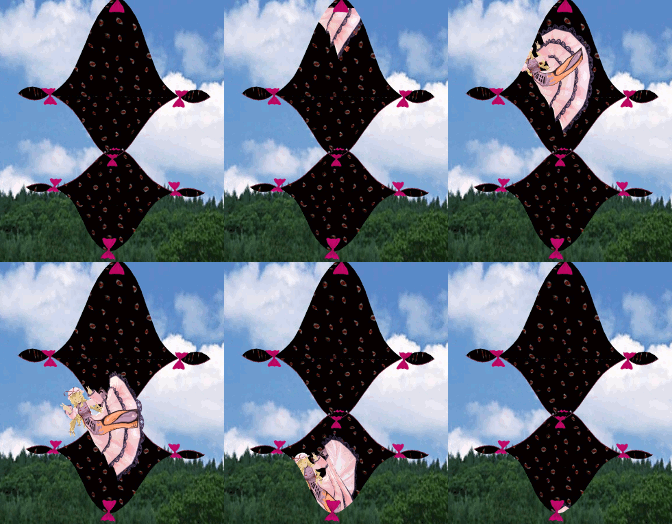
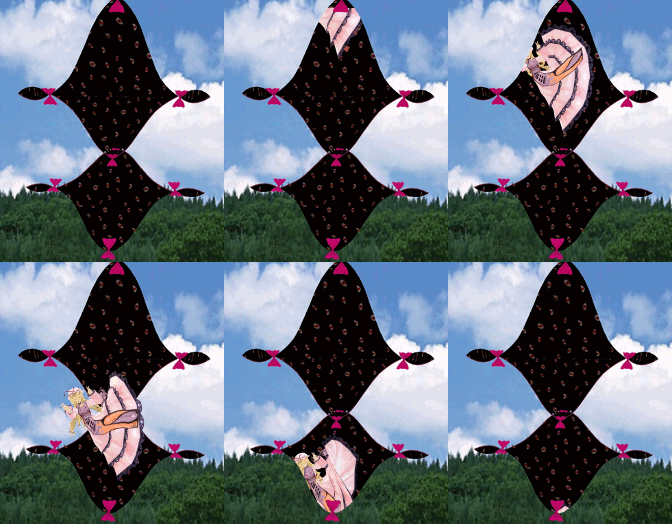
Yukari's Gap Portal Style.I noticed that one of the major characters had an effect associated with her. Yukari Yakumo is a gap youkai. She has the ability to open up portals in time and space and thereby manipulate boundaries. The gaps she opens up seem to just float in mid-air and blend into the surrounding scenery. She can also bring and take things through these gaps.

I downloaded a version of Yukari’s Gap from this Bowl Roll account (http://bowlroll.net/up/dl40910) and the password is one that you’ll have to figure out yourself by going to the original NicoNicoDouga video (www.nicovideo.jp/watch/sm19593150 ) this isn’t a difficult password.

I would suggest that you read through Reggie’s article: https://learnmmd.com/http:/learnmmd.com/translate-romaji/#more-8325  or Stella’s article: https://learnmmd.com/http:/learnmmd.com/download-japanese-models/ before you start downloading. Don’t expect the password to magically jump out for you.

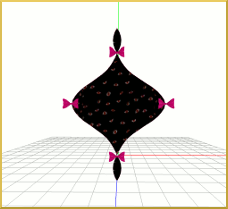
Once you have downloaded the model you would load it up just as you would a regular MMD model. You’ll notice that you have two models. One is larger than the other. It will show up as three pink bows and a series of normal bones (rotate and move). Because they are normal bones you can create motion data to open and close these gaps. The two left and right furthest from the center bow will control a whole chain. The model also has a mother bone so it can be set on its side and used that way.

Bridging the Gap.

If you want Yukari’s Gap to suddenly appear out of thin air then it would be a good idea to position the model and use the disp check box in the Model Manipulation Panel (MMP). For more details about this feature I would recommend you check out these two articles: https://learnmmd.com/http:/learnmmd.com/use-stage-changes-in-mmd/

https://learnmmd.com/http:/learnmmd.com/how-to-switch-models-and-stages-in-mikumikudance/

Please note that only the bows will appear and disappear. The most troublesome thing, about working with Yukari’s Gap, is not knowing its boundaries. The effect is invisible and it can hide a lot ofYukari's Gap Open. the stage, model and accessories. I know of two ways to work around this. The first is to change the draw order of the models so that Yukari’s Gap appears as a solid white block with bows on it. This is done by clicking on the Background tab on the main menu bar.  The other way is to load up the model and open up the gap. This will allow you to see how the model works in situ. After you have finished your model’s motion data you can add in any opening, closing and display data.
I have uploaded a video showcasing the gaps and two different Yukari models at our YouTube channel: http://youtu.be/lYFiLIff_7U

Have fun with this.

Sources:

Yukari Yakimo by Min.
Yukari’s Gap model from anonymous’ Bowlroll Account
Sky dome by Kaahgome.


– SEE BELOW for MORE MMD TUTORIALS…


— — —


– _ — –


Visit the LearnMMD.com Homepage! Plenty of Mikumikudance instruction and info!

More MMD Tutorials...

Enjoy the "camera Angles WEIRD in Anime" meme...

Enjoy the "camera Angles WEIRD in Anime" meme... This image is from The Slayers - NEXT, ...read more

Reader asks how to create MMD artwork... stuff like posing, camerawork?

A reader asks... Is there a tutorial on how to create MMD artwork, like those you ...read more

Learn MikuMikuDance in Small Steps! New LearnMMD Video Series

Learn MikuMikuDance in Small Steps. Where can I find easy-to-follow MMD instructions on YouTube? How ...read more

Apply Multiple Effects on an Entire MMD Model Using M4Layer Effect

How can I apply multiple effects to an MMD model? Can I use more than ...read more

MMD Plugin Manager... I Found a Treasure!

What sorts of MMD Plugins are there? MMD Plugin Manager? MMD Plugins. Plugin MMD. More ...read more

2025: Hatsune Miku is 18... but she is designed to be always 16 Years. Old by design and in reality!

Finally, in 2023, Hatsune Miku is 16 years old! but in August of 2025, she ...read more

ARIZONA, MMD Tutorials, Special Effects

Post navigation

Previous Post: Adding & Working the Stage Lights with Dummy Bones MMD MikuMikuDance
Next Post: Use proper MMD Etiquette when Downloading Models for MMD

Related Posts

  • MME fireintheskies effect
    MME FireintheSkiesEffect gives floating flame and embers! FireintheSkiesEffect
  • "Say cheese!" Setting up the camera moves in MMD 7.39 takes some thought. Credits: MMD Little Town by Harner Productions, Chibi Miku Yamato Style 1.35 by Koshitsuki, Chibi NC DT SeeU by HousekineMinto, Video Camera by Dark Konata
    Camera Motion Instructions 1 – MMD Basics ARIZONA
  • Adjusting the Physical Operation Tab settings in MMD 9.10 Functions-Copy-Paste-Expand
  • Post Effect cannot be specified
    Fix the “Post Effect cannot be specified” error Chris no Akumu
  • Multiply of Facial Expression command in MMD Animation Shortcuts
  • Bandizip® keeps Japanese file names intact when Extracting ZIP folders Bandizip

More Related Articles

Easy Fun MMD Music Video Mahlazer Motion Download “Feel the Sound” MMD Basics
RAY-MMD: Spruce up your videos with Dynamic Lighting MMD Tutorials
Motion is LOCAL, per the Model's orientation, or GOBAL, per the Program's Grid. (Meiko Sakine from MMD 7.39) Local and Global Mode Bone Movement MMD: Miku’s Mode Swings ARIZONA
VOCALOID 3 Tutorial – The whole interface on a basic level Kazuki Matsuoka
Rendering HD 60 FPS MMD video and YouTube Upload HD Videos in MMD
Use the Silhouette Effect to create White Silhouettes! Creating White Silhouette Models in MikuMikuEffects ARIZONA

Comments (2) on “The In’s and Out’s of Yukari’s Gap for MikuMikuDance.”

  1. Mindslash says:
    November 29, 2016 at 8:33 am

    Yes, Bad Apple is the most famous… it’s also the most OVERUSED dance ever.

    Reply
  2. rosechaaan says:
    January 1, 2015 at 7:48 pm

    YAAAY! I saw this on the MMD Bad Apple video a while back and really wanted to get it, and now I can! Thanks!

    Reply

Leave a Reply Cancel reply

Your email address will not be published. Required fields are marked *

Download the latest version of MikuMikuDance!
See the MMD Step-by-Step instructions page!
Learn how to make your own MMD motions!
LearnMMD.com
  • Formatting Captions With MMM MikuMikuMoving Bullwood
  • My VDE-3 Entry has Music, Camera, Dancers… Now for the HARD part. "the making of" my video
  • What!
    How to Load Models, Motion, and Music Data into MikuMikuDance ARIZONA
  • The UT Video Codec Suite works well with Render to AVI in MMD.
    UT Video Codec Suite v22.2.0 creates simple AVI video for MMD background AVI Reggie Dentmore
  • Keep The Faith MMD
    Growing Concerns Amongst Japanese MMDers Downloading New Models
  • Print a hard copy! Art is fleeting… especially NOW! MMD Tutorials
  • MMD Credit Helper and PMMLookupper File Management / Organization
  • Kaito and the SpotLight Effect.
    Using the SpotLight Effect in MikuMikuEffects ARIZONA

Copyright © 2022 Learn MikuMikuDance – MMD Tutorials – Free 3D Animation Software and Instructions..

Powered by PressBook Premium theme

Go to mobile version