



How do I do MikuMikuDance 9.32? How do you get started with Miku Miku Dance? How do I move my dancer in MMD 9.32? What do I do with MikuMikuDance? LearnMMD MikuMikuDance tutorials. What should I do first? How do I learn how to use MMD?
A Beginner’s Guide to
Enjoying MikuMikuDance MMD 9.32
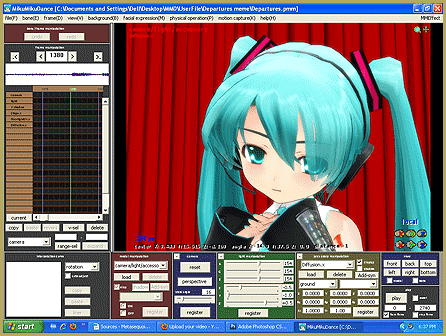
 New MMDers download the program after watching some fun and amazing videos on YouTube. (I know I was just amazed that such a powerful animation software was available for free!) Going from the “wonderful videos” to the reality of the “empty coordinate grid” is a bit of a shocker! New MMDers find a complicated GUI and no instructions.
Thank goodness you found LearnMMD.com!
First, Play the Sample Dance …
The first thing to do is to go to the File Start Here pages to learn how to swap dancers!” src=”https://learnmmd.com/wp-content/uploads/2012/06/RinSampleDanceRD.gif” alt=”Rin dances the Sample Dance! See the Start Here pages to learn how to swap dancers!” width=”164″ height=”226″ />menu and click Open … and select the “sample.pmm” or “sample(AllStar).pmm”, let it load, click PLAY and watch the coordinate grid come to life as MMD shows you what it can do! If your computer is up to the task, the dance will move smoothly (and silently … there is no music included with the sample dance!). If your computer is a little slow or has a weak graphics card, the dance will be shown in a herky-jerky fashion. The jerky playback is not any kind of a problem for you to be concerned with, yet … Just know that, as you progress into more complicated animations, yourself, you will have some trouble getting a smooth playback of your own creations. You can still process your animations into AVI files that WILL play smoothly using Windows Media Player, Real Player, and the like … and they will be uploadable to YouTube! You will find that your simple, beginner projects will playback just fine.
 Next, Load a Dancer!
 Next, Load a Dancer!
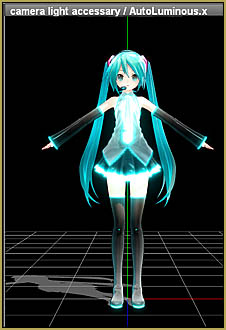
Close the Sample Dance by going to the FILE Menu and selecting NEW. You will, again, see the blank white Coordinate Grid. LOAD a dancer (an MMD model) by clicking the LOAD button near the lower left of the screen. Choose MIKU (everybody does!) … and commence to click and drag everything. Try all the buttons and sliders. Be as rough on poor little Miku as you care to be … bend, contort, flip, twist, waggle … all good clean fun!
ADVERTISEMENT
Getting around on the Screen …
It took me forever to learn how easy it is to move your point of view around your model and around your stage. (By accident I saw some instructions on the web while I was looking for something else.) Simply right-click an inch or two off to the side of your model and drag your view around … easy! Click your center mouse button and drag to gently move the whole view. In the Upper Right of the white stage screen is a magnifying glass that you can left-click and drag up and down to move in and out of the stage area. Click and drag that green cross to move the entire view (just like clicking the center mouse button).
Make a little Jump Dance!
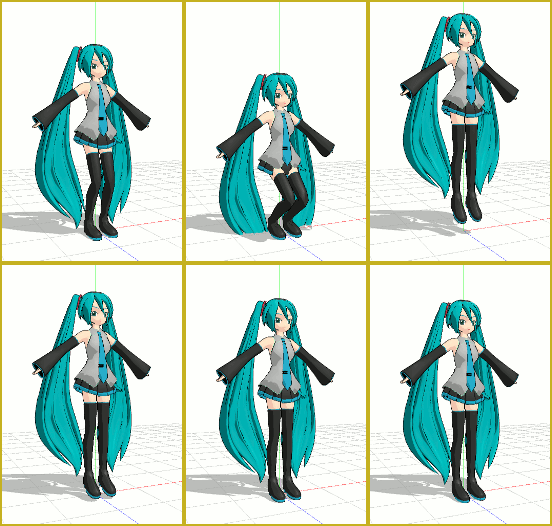
See the LearnMMD article about the little “Jump Dance”. It’s a great way to learn about adjusting your model, moving through the frames, registering your motions data, and getting to push PLAY for your own first animation. …There’s another article about “Miku Jumping Jacks”, too. Simple fun!
Try the “Happy Hands” Meme
In the MMD world, a meme (rhymes with seem) is a popular little video that is  repeated by hundreds of users on YouTube. Each of those users downloaded the same motion and music files … and added their own artistic touch before uploading their version of that meme back up to YouTube. Some do it just for the fun of it. Some do it to show off the dance models in their collection. YOU can do it, too! Read and follow the LearnMMD article about doing the Happy Hands meme. Memes are like MMD kits!
So much to learn
from LearnMMD.com
LearnMMD is a treasure trove of info for MMD beginners with a TON of MikuMikuDance Tutorials! See the Start Here pages … the HOW TO page … the Downloads page … the MikuBall pages … The New Model pages … the Japanese translation article … and so much more! . Enjoy … click and explore … you can’t “break” anything … have fun … You can even ask us questions via email: LearnMMD@aol.com
“Let’s learn how to do everything!”
– SEE BELOW for MORE MMD TUTORIALS…
— — —
– _ — –




Can I make My mmd vines with Rayman and Undertale?
hello how do you acttally animate? like play the animaiton? (i know were the play button is,I just cant figure how to make a clip)
Please see the step-by-step instructions… I hope that helps!
This is really great program. I started to learn and like it. One downside for me is that fonts are very small. how many hours will it take approximately for a beginner to learn MMD completely?
Only about 45-minutes, actually. … Just kidding! … The more you play with it, the more you will learn… the more you learn, the more you can do… the more you do, the more you will learn… I have been running MMD since 2011… and I still learn new tricks.
love you kaito
Where is the “PLAY” Please tell me because I can’t play anything cuz IDK where the play button is
It’s in the rightmost lower panel.
Where is it? i still cant find it, can u send a screenshot of where it is???